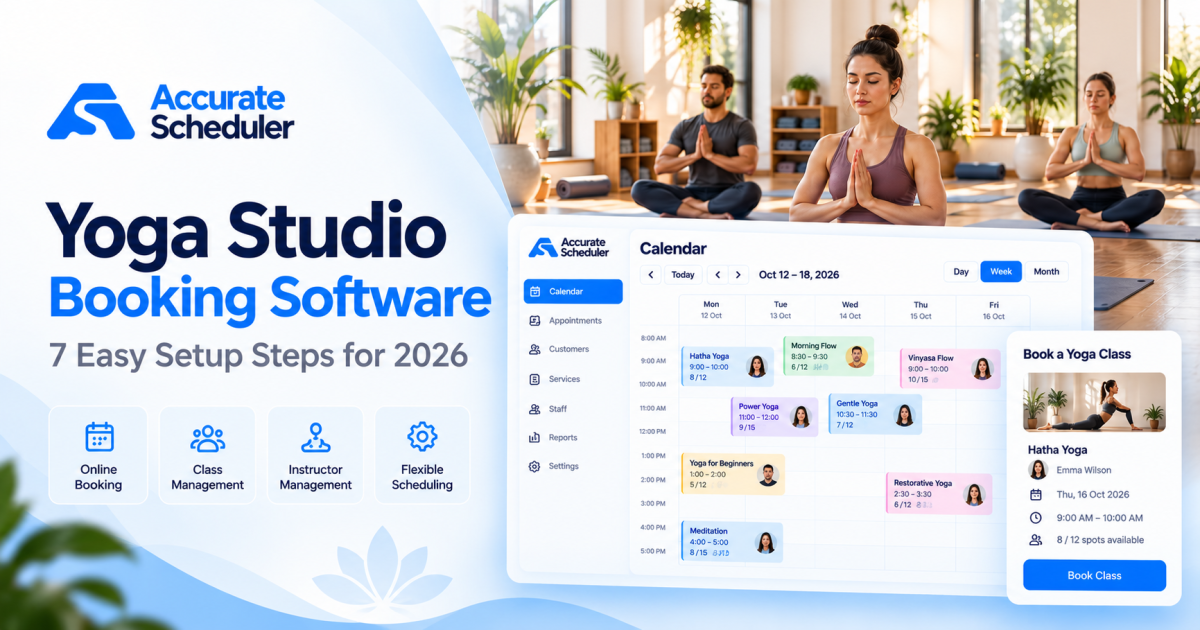
Managing a yoga studio means balancing class schedules, instructor availability, student reservations, and payments. As your studio grows, handling these tasks through phone calls, spreadsheets, and messages can become difficult.
The right yoga studio booking software helps students reserve sessions online while giving instructors and studio owners a clearer view of upcoming appointments.
Whether you teach private yoga sessions, run small group classes, or offer online instruction, a reliable booking process can reduce administrative work and improve the student experience.
In this guide, we’ll explain how to set up yoga studio booking software in seven practical steps using Accurate Scheduler. We’ll also cover class capacity, instructor schedules, payments, and common mistakes to avoid.
What Is Yoga Studio Booking Software?
Yoga studio booking software is a scheduling system that allows students to reserve yoga sessions through an online booking page.
Depending on the platform, it may support private appointments, group classes, instructor availability, payments, and booking management.
For example, a student might visit your booking page, select a beginner yoga session, choose an available time, and complete the reservation.
The studio can then review the appointment through its scheduling dashboard.
Why Yoga Studios Need Online Booking
Online scheduling is particularly useful when a studio offers several types of sessions:
- Private yoga lessons.
- Beginner yoga classes.
- Hatha yoga.
- Vinyasa yoga.
- Meditation sessions.
- Online yoga consultations.
- Small-group workshops.
Without a centralized booking process, students may reserve sessions through different channels, making availability difficult to manage.
A scheduling platform helps organize reservations, but it still requires accurate instructor schedules and class capacity settings.
7 Steps to Set Up Yoga Studio Booking Software
Step 1: Create Your Online Booking Account
Start by choosing a scheduling platform that supports your teaching model.
For small yoga studios, essential requirements usually include instructor availability, service durations, customer booking pages, and cancellation management.
If you offer group classes, also verify that the platform supports the required number of participants per session.
Accurate Scheduler provides a hosted booking system with staff scheduling, customer appointments, and additional paid features for more advanced workflows.
Visit Accurate Scheduler to explore the platform and available plans.
Step 2: Add Your Yoga Services and Classes
Create the sessions that students can book.
Here is an example yoga studio service list:
| Service | Duration | Example Price |
|---|---|---|
| Private Yoga Session | 60 minutes | $45 |
| Beginner Hatha Yoga | 60 minutes | $15 |
| Vinyasa Flow | 75 minutes | $20 |
| Meditation Session | 45 minutes | $12 |
| Personal Yoga Consultation | 30 minutes | $25 |
| Weekend Yoga Workshop | 120 minutes | $40 |
These prices are illustrative and should be adjusted for your location and business model.
When creating each service, configure its duration, price, and eligible instructors.
For group classes, ensure your selected booking configuration supports the intended participant capacity.
Step 3: Configure Instructor Availability
Different yoga instructors may teach different styles or work at different times.
For example, one instructor may lead morning Hatha yoga sessions, while another teaches evening Vinyasa classes.
Configure individual instructor availability so students can book only appropriate sessions.
An example schedule:
| Instructor | Specialization | Availability |
|---|---|---|
| Emma | Hatha Yoga | Monday to Friday, mornings |
| Olivia | Vinyasa Yoga | Tuesday to Saturday, evenings |
| Sophia | Meditation | Wednesday to Sunday, afternoons |
Accurate Scheduler supports staff shifts, holidays, and service assignments.
These settings help maintain a more organized booking calendar.
Step 4: Set Class Capacity and Group Booking Rules
Class capacity is one of the most important considerations for yoga studio booking software.
A private session usually reserves one instructor for one student. A group class may allow several students to book the same session.
For example, a yoga studio might have space for 12 mats.
Your booking process should prevent additional reservations once all available spaces are occupied.
Accurate Scheduler offers group booking and Multiple Quantity functionality in supported paid configurations.
Before launching, verify which feature matches your class booking workflow, test capacity enforcement, and review compatibility restrictions between booking add-ons.
Do not assume that capacity settings also provide waitlists, recurring memberships, or attendance check-in. Those are separate capabilities.
Step 5: Configure Online Payments
Yoga studios may accept payments before a session or collect payment at the studio.
Your booking system should clearly explain the available payment options.
Accurate Scheduler supports PayPal, with Stripe available through paid functionality.
Before accepting paid bookings, test the payment process and verify that successful transactions are associated with the correct appointment.
If you sell memberships or multi-class packages, confirm that your platform supports the required credit tracking and recurring billing workflow. Basic appointment payments do not automatically provide these features.
Explore the payment features.
Step 6: Set Up Booking Confirmations and Notifications
Students should know whether their reservation was successful.
A booking confirmation should clearly communicate the session name, date, time, and relevant booking details.
Depending on your configuration, you may also want reminders before the class begins.
Useful notification events include:
- New appointment confirmation.
- Upcoming session reminder.
- Appointment cancellation.
- Appointment rescheduling.
- Staff schedule changes, where supported.
Accurate Scheduler provides scheduled notification functionality in supported plans.
Test your notification templates and delivery channels before relying on them for live bookings.
Step 7: Test and Share Your Yoga Booking Page
Before launching, complete a booking as if you were a student.
Check that the correct services, instructors, dates, times, and prices appear.
For group classes, test the capacity limit.
For private appointments, verify that the same instructor cannot be assigned to conflicting bookings.
Also review the experience on mobile devices.
Once everything works correctly, share your booking page through your website, social profiles, email communications, and other customer channels.
Try the Accurate Scheduler Yoga Studio Demo:
Private Yoga Sessions vs Group Classes
Yoga studio booking software should reflect the difference between private and group sessions.
| Requirement | Private Yoga Session | Group Yoga Class |
|---|---|---|
| Participants | Usually one student | Multiple students |
| Instructor | Assigned instructor | Assigned class instructor |
| Availability | Instructor’s open time | Scheduled class time |
| Capacity | One reservation per occupied slot | Limited number of places |
| Payment | Per private session | Per participant or class |
| Scheduling | Flexible appointments | Often fixed class timetable |
A small yoga business offering mainly private instruction may need only straightforward appointment scheduling.
A larger studio selling memberships, recurring classes, waitlists, and class passes may require specialized studio management features.
This distinction matters when comparing software. Industry-specific platforms such as Mindbody and other yoga management systems offer membership and class management workflows beyond basic appointments.
For additional context, see Mindbody’s yoga studio software comparison.
Common Yoga Studio Booking Mistakes to Avoid
Allowing More Students Than Available Spaces
Always configure class capacity according to the room, instructor, and equipment available.
Test the booking process after the class reaches its maximum capacity.
Forgetting Instructor Holidays
If an instructor is unavailable, update their schedule before students reserve sessions.
Using Incorrect Session Durations
A 60-minute yoga class may require additional preparation or cleanup time.
Configure realistic occupied time and buffer settings where appropriate.
Confusing Group Booking With Membership Management
Group booking controls participation in a session. Membership management involves billing periods, passes, credits, and entitlement rules.
Confirm both requirements independently.
Ignoring Mobile Booking
Students may book sessions from their phones.
Test service selection, time slots, forms, and confirmation screens on mobile devices.
Not Reviewing Cancellation Policies
Define when students can cancel or reschedule, and explain the policy clearly before booking.
For related advice, read our guide on reducing appointment no-shows.
How Much Does Yoga Studio Booking Software Cost?
Yoga scheduling software pricing varies based on appointment limits, instructors, group capacity, payment features, and advanced integrations.
A solo yoga instructor may need a simpler plan than a studio with several teachers and daily group classes.
Before choosing a platform, compare:
- Monthly or annual subscription fees.
- Appointment and participant limits.
- Staff scheduling features.
- Group booking capabilities.
- Payment processing costs.
- Reminder and notification charges.
- Membership and package functionality.
- Support and integration requirements.
Accurate Scheduler offers Free and paid plans. Its Free plan includes unlimited staff and services, subject to applicable limits.
Review Accurate Scheduler pricing for the current details.
Frequently Asked Questions
What is the best yoga studio booking software for a small studio?
The best option depends on whether you offer private sessions, group classes, or memberships. Accurate Scheduler is worth considering for appointment scheduling and supported group booking workflows. Studios needing advanced membership billing, waitlists, or attendance tracking should verify those requirements separately.
Can students book yoga classes online?
Yes. Yoga booking software allows students to choose available sessions and complete reservations through an online booking page.
Can yoga studio software manage multiple instructors?
Yes. Accurate Scheduler supports multiple instructors, individual shifts, holidays, and service assignments.
Can I accept payments for yoga sessions?
Accurate Scheduler supports PayPal and paid Stripe functionality. Confirm the configured payment workflow before accepting customer bookings.
Can I offer both private yoga appointments and group classes?
Yes, provided the booking configuration supports the relevant appointment and group capacity requirements.
Do I need a website for yoga appointment booking?
Not necessarily. A hosted booking page can be shared directly with students. A website can provide additional information about your instructors, classes, and studio.
Does yoga studio booking software include memberships?
Not always. Appointment scheduling, class capacity, membership billing, and class-pass tracking are different features. Verify each capability before choosing software.
Final Thoughts: Choosing Yoga Studio Booking Software
The right yoga studio booking software should make it easier for students to reserve sessions and for instructors to manage their schedules.
Start with your actual requirements. A solo instructor offering private lessons may need simple appointment booking, while a studio running group classes may need participant limits and more advanced scheduling controls.
Accurate Scheduler provides online booking, instructor scheduling, customer management, and supported group booking functionality for businesses that need these capabilities.
Ready to simplify your yoga studio appointments?
Explore Accurate Scheduler or try the Yoga Studio Demo.
Configure your services, add instructors, test your booking rules, and give students a simpler way to reserve their next session.