
Make room for patient care.
Help people find an available appointment without tying up your reception desk. Organize service times and staff availability while keeping your clinical systems and care decisions separate.
Compare appointment limits and plan features →
Give reception a clearer starting point.
Fewer scheduling calls
Offer an online route for routine appointment requests during and outside reception hours.
Different visits, different time
Separate consultation types so a follow-up does not have to use the same duration as an initial visit.
Staff time away
Record shifts and holidays so the booking setup reflects the team’s working day.
Organize the visit before the visit.
Initial consultations
Provide a clearly named appointment type for a first conversation with a practitioner.
Follow-up visits
Create a separate service for a return visit, with an appropriate time allocation.
Wellness appointments
Offer routine wellness services with clear staff choices and availability.
Make appointment details easier to find.
Use service setup, staff schedules and the customer panel for appointment administration. Scheduled Notifications is included in Free.
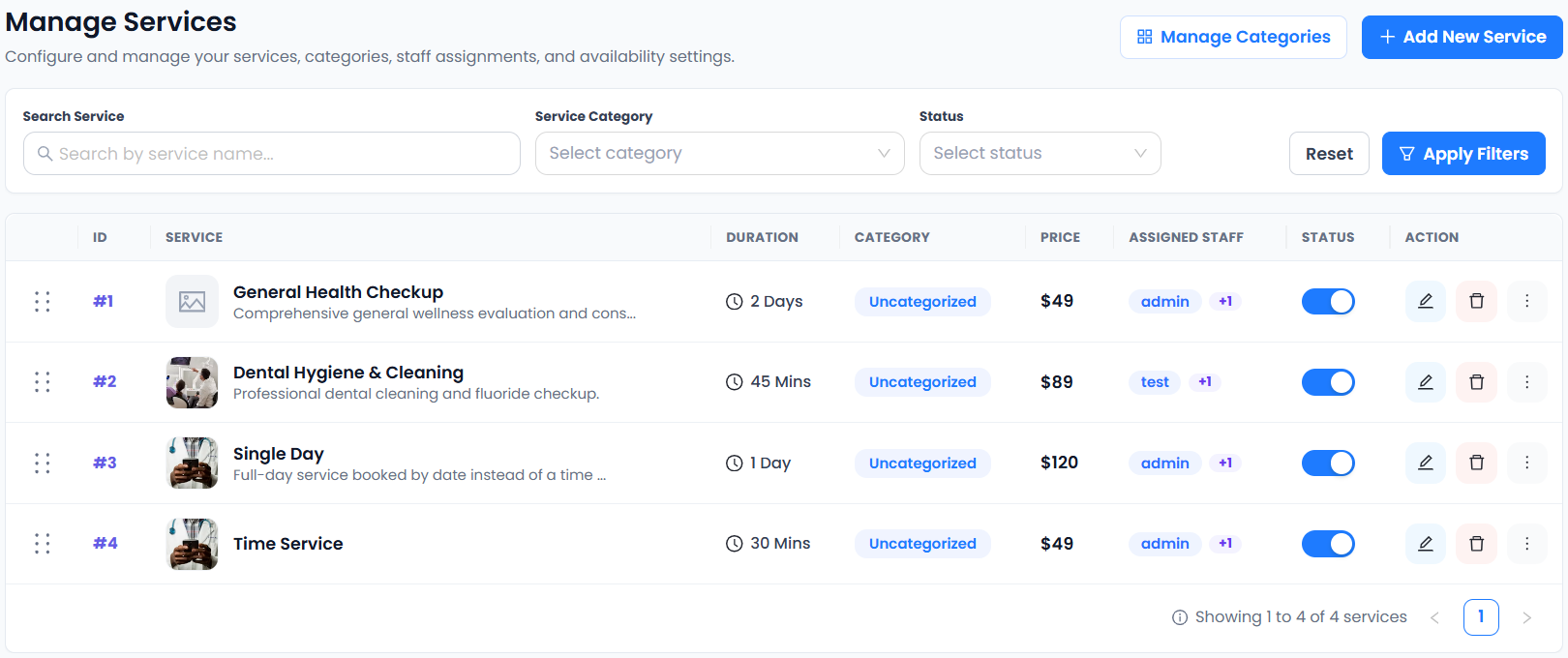
This real service-management capture includes example healthcare services. It demonstrates scheduling setup, not clinical records or medical advice. See which plan fits your workflow.
From choosing a service to making a booking.
- 01Choose a service
- 02Choose staff
- 03Choose a date & time
- 04Enter details & confirm
More time for the person in front of you.
A clear booking route can reduce routine coordination for your reception team. Keep sensitive medical information in systems approved for your practice and jurisdiction.
Connect the tools your day depends on.

Availability varies by plan. Explore integrations →
Scheduling for healthcare: a few things to know.
Can I use this for clinical records?
This website describes appointment scheduling, not an electronic health record. No healthcare compliance certification is asserted here. Review privacy, security and regulatory requirements before collecting patient information.
Can each practitioner have a different schedule?
Yes. Unlimited Staff Members, Staff Shift Management and Staff Holiday Management are included in Free. Configure availability around each practitioner’s working hours.
Can patients cancel an appointment themselves?
Customer Appointment Cancellation and the Customer Panel are included in Free. Rescheduling is included in paid plans. Your practice should communicate its own cancellation terms clearly.
Can I send appointment notifications?
Scheduled Notifications is included in paid plans. Confirm delivery settings and the content of messages before using them with patients; avoid including sensitive clinical details.
Can I send generic appointment status updates on WhatsApp?
WhatsApp Notifications supports approved appointment status templates through Meta or Twilio. Keep clinic messages generic and leave sensitive medical details out of templates. Obtain recipient agreement and review provider requirements; messaging charges may apply.
Is multilingual booking available for clinic appointments?
35+ Languages is included in Free and Paid. Review booking labels in your chosen language; write your own service descriptions clearly. Keep WhatsApp status templates generic and avoid sensitive medical information.