
A clearer calendar for focused work.
Discovery calls, focused client sessions and project work all compete for the same day. Give clients a clear way to book while keeping space for preparation and delivery.
Compare appointment limits and plan features →
Protect the work between your calls.
End the email chase
Let clients choose an available consultation instead of comparing proposed times over email.
Leave room to prepare
Use buffer time on a paid plan to separate a client conversation from your next commitment.
Keep changes manageable
Customer cancellation and paid-plan rescheduling give a changed appointment a clear next step.
A booking path for each kind of conversation.
Discovery calls
Create a distinct service for an introductory conversation, with its own duration.
Paid consultations
Set a consultation price and connect a supported payment provider before sharing your booking page.
Client follow-ups
Offer a follow-up service that clients can book when they are ready for another session.
Rates for selected appointments
Apply a different service price for selected staff members or appointment time ranges, then check the customer summary.
One place to organize client time.
Start with services, staff and online booking. Add calendar sync, buffer time and rescheduling as your workflow needs them.
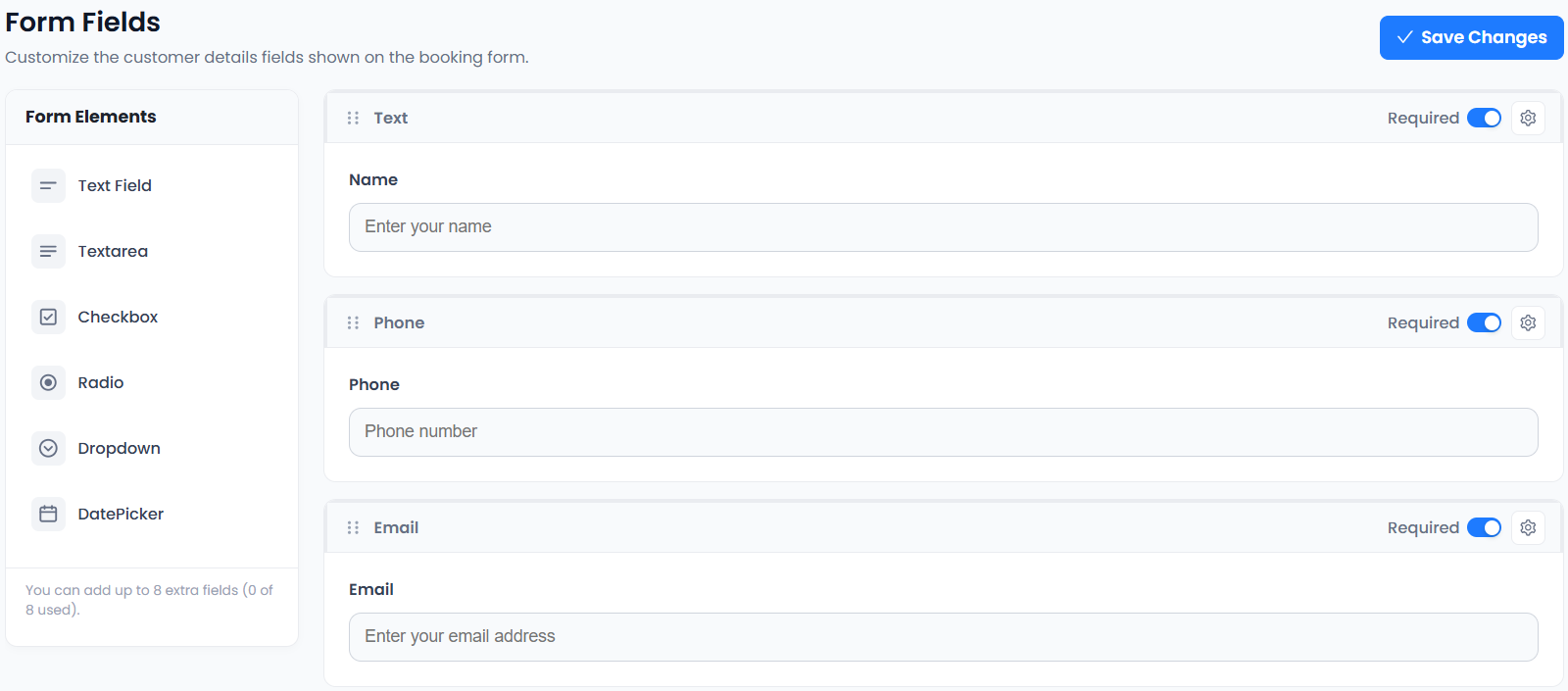
The supplied custom-fields editor shows how a booking form can collect context before a meeting. Custom Fields is a paid-plan feature. See which plan fits your workflow.
From choosing a service to making a booking.
- 01Choose a service
- 02Choose staff
- 03Choose a date & time
- 04Enter details & confirm
Less coordination. More focused client work.
A clear service menu helps clients book the right conversation. Shared availability and meeting integrations help your team spend less of the day arranging it.
Connect the tools your day depends on.



Availability varies by plan. Explore integrations →
Scheduling for consultants: a few things to know.
Can clients book different kinds of consultations?
Yes. Unlimited Services is included in Free. Create separate services for introductory calls, paid consultations and follow-ups, with appropriate durations.
Can clients reschedule a consultation?
Rescheduling is included in paid plans. Customer Appointment Cancellation and the Customer Panel are included in Free. Set a clear cancellation policy in your own booking information.
Can I connect online meetings to bookings?
Zoom Meeting is available on paid plans; Google Meet is included in paid plans. Connect the chosen provider and test your booking flow before inviting clients.
Can I take payment for a consultation?
PayPal Payments is included in Free, while Stripe Payments is included in paid plans. Provider accounts and payment-provider fees are separate from your scheduling plan.
Can several consultants share a workspace?
Yes. Unlimited Staff Members, staff shifts and staff holidays are included in Free. The separate Staff Panel is a paid-plan feature.
Can I use Price Rules on Free?
Yes. Price Rules is included in Free and all paid plans. Configure it for each service and save the service before testing a booking.
Can I notify clients of appointment changes on WhatsApp?
Use approved Meta or Twilio templates for confirmations and rescheduling events. Configure customer and staff recipients independently of email notifications. WhatsApp Notifications is included in Free and all paid plans; provider charges may apply.
Can I set staff-specific consultation prices?
Advanced Price Rules supports staff conditions, alongside weekday, time and date conditions. Price Rules and WhatsApp Notifications are included in Free and Paid. Obtain recipient agreement before sending WhatsApp updates.
Can I offer consultation booking through a Shopify storefront?
Use the shared booking widget in a suitable Shopify storefront custom-code section. Consultations and enabled appointment payments are managed in Accurate Scheduler, separately from Shopify checkout; automatic Shopify orders are not claimed.