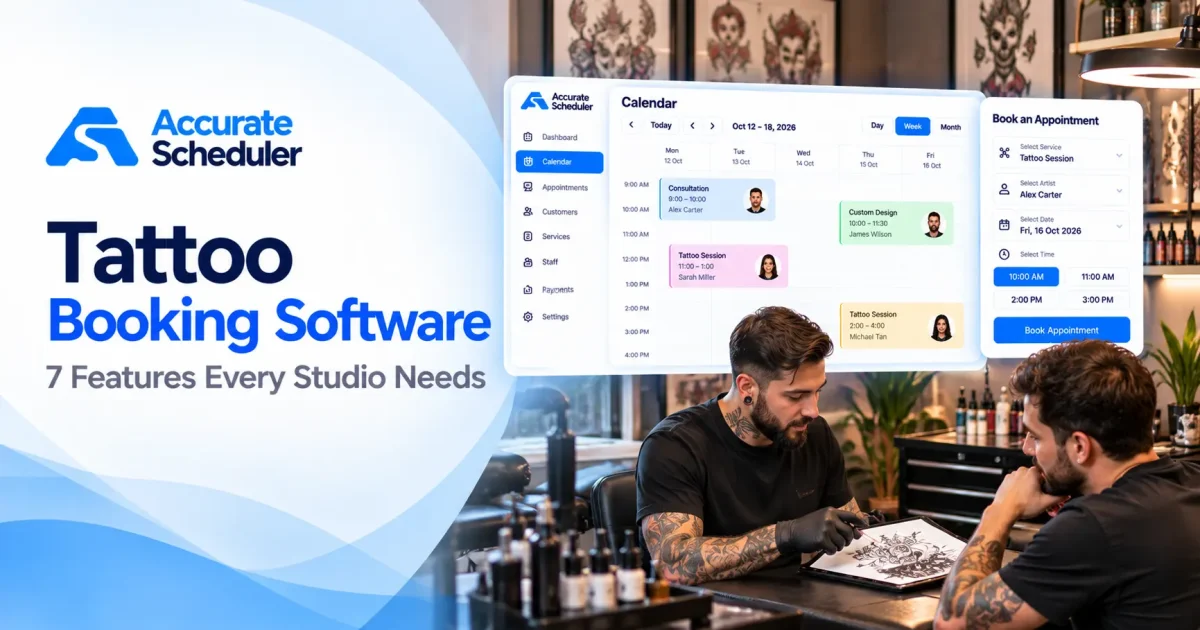
Choosing the right tattoo booking software can help tattoo artists spend less time organizing appointments and more time creating artwork. Whether you’re an independent tattoo artist or manage a busy studio, an effective booking system makes it easier to schedule consultations, manage artist availability, and organize tattoo sessions.
Unlike many other appointment-based businesses, tattoo studios often handle custom designs, variable session lengths, and projects that require several visits.
A small tattoo may take less than an hour, while a detailed sleeve or back piece can involve multiple sessions over several weeks.
That means a basic calendar isn’t always enough.
In this guide, we’ll explore seven essential tattoo booking software features, common scheduling challenges, and practical ways to manage tattoo appointments online.
What Is Tattoo Booking Software?
Tattoo booking software is an appointment scheduling system that helps tattoo artists and studios organize customer bookings, consultations, and tattoo sessions.
A typical booking process may involve:
- A customer selecting a consultation or tattoo service.
- Choosing an available tattoo artist.
- Reviewing available dates and times.
- Entering the necessary booking information.
- Completing an appointment reservation.
The appointment is then recorded in the studio’s booking calendar.
Some specialized tattoo studio platforms also provide digital consent forms, reference image collection, tattoo project tracking, and deposit management.
However, these capabilities are not included in every appointment booking system.
For studios primarily seeking online scheduling, a general appointment platform may be sufficient. Studios requiring detailed tattoo-specific workflows should evaluate dedicated tattoo management software.
Why Tattoo Studios Need Online Booking Software
Many tattoo artists receive appointment inquiries through Instagram, social media messages, telephone calls, and their websites.
Managing these conversations manually can become difficult when multiple artists share a studio.
A tattoo booking system can help businesses:
- Accept consultation appointments online.
- Organize individual tattoo artist schedules.
- Manage tattoo session durations.
- Display available booking times.
- Maintain customer appointment information.
- Handle appointment cancellations.
- Provide a convenient mobile booking experience.
The goal is to create a clear scheduling process without making the customer experience unnecessarily complicated.
1. Online Tattoo Appointment Booking
Online booking is one of the most useful features for tattoo artists.
Customers should be able to schedule an initial consultation or a clearly defined appointment without waiting for the studio to answer a message.
What to Look For
A practical tattoo appointment booking system should offer:
- Mobile-friendly booking pages.
- Clear appointment types.
- Available dates and times.
- Artist selection.
- Simple customer booking forms.
- An organized appointment calendar.
Example
Imagine a customer interested in a custom forearm tattoo.
Instead of immediately reserving a four-hour session, the studio may prefer to offer a 30-minute consultation first.
The customer can book that consultation online, discuss the design with the artist, and arrange the tattoo session afterward.
This approach is particularly useful when the final appointment duration cannot be estimated before reviewing the artwork.
Accurate Scheduler provides hosted booking pages that can be shared with customers.
Explore online appointment booking.
2. Flexible Tattoo Session Durations
Tattoo appointments can vary significantly in length.
A small lettering tattoo might require a relatively short session, while a detailed custom design may need several hours.
Your tattoo artist scheduling software should allow different appointment durations.
Example Tattoo Studio Services
| Appointment Type | Example Duration |
|---|---|
| Initial Tattoo Consultation | 30 minutes |
| Small Tattoo Session | 60 minutes |
| Medium Tattoo Session | 120 minutes |
| Large Tattoo Session | 240 minutes |
| Follow-Up Consultation | 30 minutes |
| Touch-Up Appointment | 60 minutes |
These are illustrative durations. Actual tattoo sessions depend on the design, artist, and studio.
For complex projects, avoid promising a fixed duration before an artist has assessed the design.
A practical approach is to offer predefined consultation appointments and create longer tattoo sessions once the scope is agreed.
Accurate Scheduler supports configurable services and appointment durations.
3. Individual Tattoo Artist Scheduling
A tattoo studio may have several artists with different schedules, styles, and specializations.
One artist may specialize in fine-line tattoos, while another focuses on realism or traditional designs.
Your booking software should allow you to organize their availability separately.
Example Artist Schedule
| Artist | Specialization | Working Days |
|---|---|---|
| Alex | Fine-Line Tattoos | Monday to Friday |
| Jordan | Black and Grey Realism | Tuesday to Saturday |
| Taylor | Traditional Tattoos | Wednesday to Sunday |
Illustrative schedule.
If Alex is unavailable on Friday, customers should not see appointments with Alex during that period.
Important scheduling features include individual working hours, holidays, service assignments, and accurate availability.
Accurate Scheduler supports unlimited staff members, individual shifts, holidays, and service assignments in its Free plan, subject to applicable booking limits.
Learn more about team scheduling.
4. Consultation Booking Before Tattoo Sessions
Custom tattoo work often requires more discussion than a standard service appointment.
Before confirming a session, an artist may need to review:
- Tattoo size and placement.
- Design complexity.
- Preferred artistic style.
- Approximate session duration.
- Pricing expectations.
- Artist availability.
A separate consultation service helps studios organize this process.
Example Consultation Workflow
Step 1: The customer books a tattoo consultation online.
Step 2: The artist discusses the requested design and placement.
Step 3: The artist estimates the time required and explains the studio’s booking policies.
Step 4: The studio schedules the tattoo session once the project details are agreed.
For simple, standardized services, direct booking may be appropriate. For custom work, consultation-first scheduling can be a better fit.
If your studio requires reference image uploads, manual project approvals, or design-specific intake workflows, confirm that your chosen platform supports those requirements before relying on it.
5. Buffer Time Between Tattoo Appointments
Tattoo artists need appropriate preparation time between clients.
This can include workstation cleaning, equipment preparation, surface disinfection, and other required hygiene procedures.
Your tattoo booking system should account for this time.
Example
Suppose an artist schedules a three-hour tattoo session and requires 30 minutes afterward for cleaning and preparation.
The total occupied scheduling period is:
180-minute tattoo session + 30-minute buffer = 210 minutes
Without buffer time, another customer might be offered an appointment immediately after the tattoo session ends.
Accurate Scheduler offers buffer time functionality in supported paid plans.
Learn more about appointment buffer time.
Buffer time is a scheduling aid, not a substitute for following professional hygiene requirements and local health regulations.
6. Payments, Cancellations and Booking Policies
Tattoo studios often have specific rules about deposits, cancellations, and rescheduling.
These policies help protect valuable artist time, especially for long appointments.
Before choosing tattoo studio booking software, evaluate the payment and cancellation options carefully.
Questions to Ask
- Which payment gateways are supported?
- Can customers pay online?
- Can customers cancel appointments?
- Is rescheduling available?
- Can the studio communicate its booking policies clearly?
- Are deposit collection and deposit forfeiture supported?
- Can refunds be managed through the relevant payment provider?
Accurate Scheduler supports PayPal payments and Stripe functionality in relevant paid plans.
It also offers customer cancellation and paid rescheduling capabilities.
Important: Do not assume that deposit collection, partial payments, automatic deposit forfeiture, or custom tattoo-specific payment rules are supported without verifying the exact workflow.
Studios requiring complex deposit policies should test those requirements before selecting any booking platform.
Explore Accurate Scheduler payment features.
7. Affordable Pricing for Independent Artists and Studios
Pricing is an important consideration when choosing tattoo booking software.
An independent artist may only need a booking page and calendar, while a larger studio may require additional operational features.
Common Pricing Models
| Pricing Model | What to Check |
|---|---|
| Free plan | Appointment limits and included features |
| Monthly subscription | Recurring cost |
| Per-artist pricing | Cost as the team grows |
| Per-location pricing | Charges for additional studios |
| Payment processing | Transaction fees |
| Specialized features | Additional costs for tattoo-specific tools |
Is Free Tattoo Booking Software Enough?
For an independent tattoo artist primarily offering consultations and scheduled sessions, a free booking system may be a suitable starting point.
Accurate Scheduler offers a Free plan with online appointment booking, unlimited staff members, and unlimited services, subject to applicable plan limits.
However, if your studio requires integrated consent forms, detailed tattoo project tracking, or complex deposit management, you may need a specialized platform.
Review Accurate Scheduler pricing for current plan information.
Tattoo Booking Software vs Tattoo Studio Management Software
Tattoo appointment booking and full studio management are related but different requirements.
| Feature | General Booking Software | Specialized Tattoo Software |
|---|---|---|
| Online appointment booking | Core feature | Commonly included |
| Artist scheduling | Commonly included | Commonly included |
| Consultation appointments | Supported through services | Commonly included |
| Appointment durations | Core feature | Commonly included |
| Online payments | Depends on platform | Depends on platform |
| Digital consent forms | Not always included | Often available |
| Reference image management | Not always included | May be included |
| Tattoo project history | Not typically included | May be included |
| Flash design reservations | Not typically included | May be included |
| Artist commission tracking | Not typically included | May be included |
If you primarily need scheduling, a straightforward appointment system can be a practical choice.
If your studio requires complete tattoo project management, evaluate dedicated platforms before committing.
Popular Tattoo Booking Software Options
Several platforms serve tattoo artists and studios, although their capabilities vary.
Accurate Scheduler
Accurate Scheduler focuses on online booking, staff scheduling, configurable services, and appointment calendar management.
It may suit independent artists and studios that need a straightforward scheduling solution.
Its Free plan includes unlimited staff and services, subject to applicable limits.
Square Appointments
Square Appointments combines scheduling with Square’s payment ecosystem and may be suitable for studios already using Square.
Vagaro
Vagaro serves beauty and wellness businesses with appointment booking and broader business management functionality.
Booksy
Booksy combines online bookings with a customer discovery marketplace and business management tools.
Acuity Scheduling
Acuity provides configurable appointment types and scheduling workflows that may be useful for tattoo consultations.
Dedicated Tattoo Platforms
Tattoo-focused platforms such as Venue Ink and Tattoo Studio Pro are worth evaluating when consent forms, deposits, flash designs, or tattoo project records are central to the business.
For additional independent research, explore Capterra’s tattoo studio software directory.
Compare current features, pricing, and regional availability directly with each provider.
How to Set Up Tattoo Booking Software With Accurate Scheduler
You can create a basic tattoo appointment scheduling workflow in several steps.
Step 1: Create Your Account
Visit Accurate Scheduler and choose an appropriate plan.
Step 2: Create Appointment Types
Add services such as:
- Tattoo Consultation.
- Small Tattoo Session.
- Medium Tattoo Session.
- Large Tattoo Session.
- Touch-Up Appointment.
Configure suitable durations for each appointment type.
Step 3: Add Your Tattoo Artists
Create staff profiles and assign the services each artist provides.
Step 4: Configure Working Hours
Set individual artist schedules, holidays, and unavailable periods.
Step 5: Review Booking Rules
Check cancellation settings, payment options, and any relevant buffer time.
Step 6: Test Your Booking Page
Create a test consultation appointment using a mobile device.
Verify that the selected artist, service, date, and time appear correctly.
Step 7: Share Your Booking Link
Add the link to your website, Instagram profile, and relevant business listings.
Customers can then access your booking page directly.
Common Tattoo Appointment Scheduling Mistakes
Allowing Customers to Book Custom Projects Without Consultation
Complex designs may require a discussion before the artist can estimate appointment length.
Underestimating Session Duration
Allow enough time for the planned work and avoid unrealistic scheduling.
Forgetting Preparation and Cleaning Time
Include appropriate gaps between appointments.
Overlapping Artist Availability
Make sure each artist’s working hours and holidays are configured accurately.
Ignoring Deposit Requirements
If your studio relies on deposits, verify that the software supports your specific policies.
Confusing Booking Records With Consent Documentation
A scheduled appointment does not replace required consent forms or other legal records.
Frequently Asked Questions About Tattoo Booking Software
What is the best tattoo booking software for independent artists?
The best platform depends on whether you need basic scheduling or specialized tattoo management. Accurate Scheduler is an option for artists focused on online appointments, while dedicated tattoo platforms may be better for consent forms, flash reservations, and complex project workflows.
Is there free tattoo booking software?
Yes. Accurate Scheduler offers a Free plan with online booking, unlimited staff members, and unlimited services, subject to applicable limits.
Can customers book tattoo consultations online?
Yes. You can configure a consultation as a service with its own duration and availability.
Can I manage multiple tattoo artists?
Yes. Accurate Scheduler supports multiple staff members, individual shifts, holidays, and service assignments.
Can tattoo booking software accept online payments?
Many platforms support online payments. Accurate Scheduler offers PayPal and paid Stripe functionality.
Can I add time between tattoo appointments?
Yes. Accurate Scheduler offers buffer time in relevant paid plans.
Does Accurate Scheduler include digital tattoo consent forms?
Do not assume specialized digital consent, medical history documentation, or tattoo project tracking is included. Verify those requirements separately.
Do I need a website to accept tattoo appointments?
Not necessarily. Accurate Scheduler provides hosted booking pages that can be shared directly with customers.
Final Thoughts: Choosing Tattoo Booking Software
The right tattoo booking software should help artists organize consultations, manage their availability, and provide customers with a straightforward booking experience.
For independent artists and small studios focused on scheduling, a simple appointment booking system may be enough.
For businesses that require integrated consent documentation, detailed tattoo project management, or specialized deposit policies, a tattoo-specific platform may be more appropriate.
Accurate Scheduler offers a Free starting point for online appointments, with additional scheduling functionality available through paid plans.
Ready to simplify your tattoo studio appointments?
Explore Accurate Scheduler or compare Free and Paid plans.
Set up your appointment types, configure artist availability, and give customers a convenient way to schedule their next consultation.