
Keep your community moving.
Build a booking routine around coaching, assessments and training sessions. Give members a clear choice of service and trainer without interrupting your next session.
Compare appointment limits and plan features →
Keep attention on the session, not the inbox.
Messages between sessions
Let members choose from available appointment times instead of sending a string of messages.
Different trainers and hours
Set shifts and holidays for the people delivering your sessions.
Preparation between clients
Use paid-plan buffer time to leave space for notes, setup and equipment changes.
Support the way your members train.
Personal training
Create services for one-to-one coaching, with durations that fit your approach.
Fitness assessments
Give an initial assessment its own booking option rather than mixing it with regular training.
Small-group sessions
Explore paid-plan Group Booking for sessions shared by more than one participant.
Prices for selected class times
Set a replacement service price for selected class times or dates where your service configuration supports it.
A schedule that starts with your services.
Use staff availability and a booking calendar to organize individual sessions. Compare paid plans for Group Booking and Scheduled Notifications.
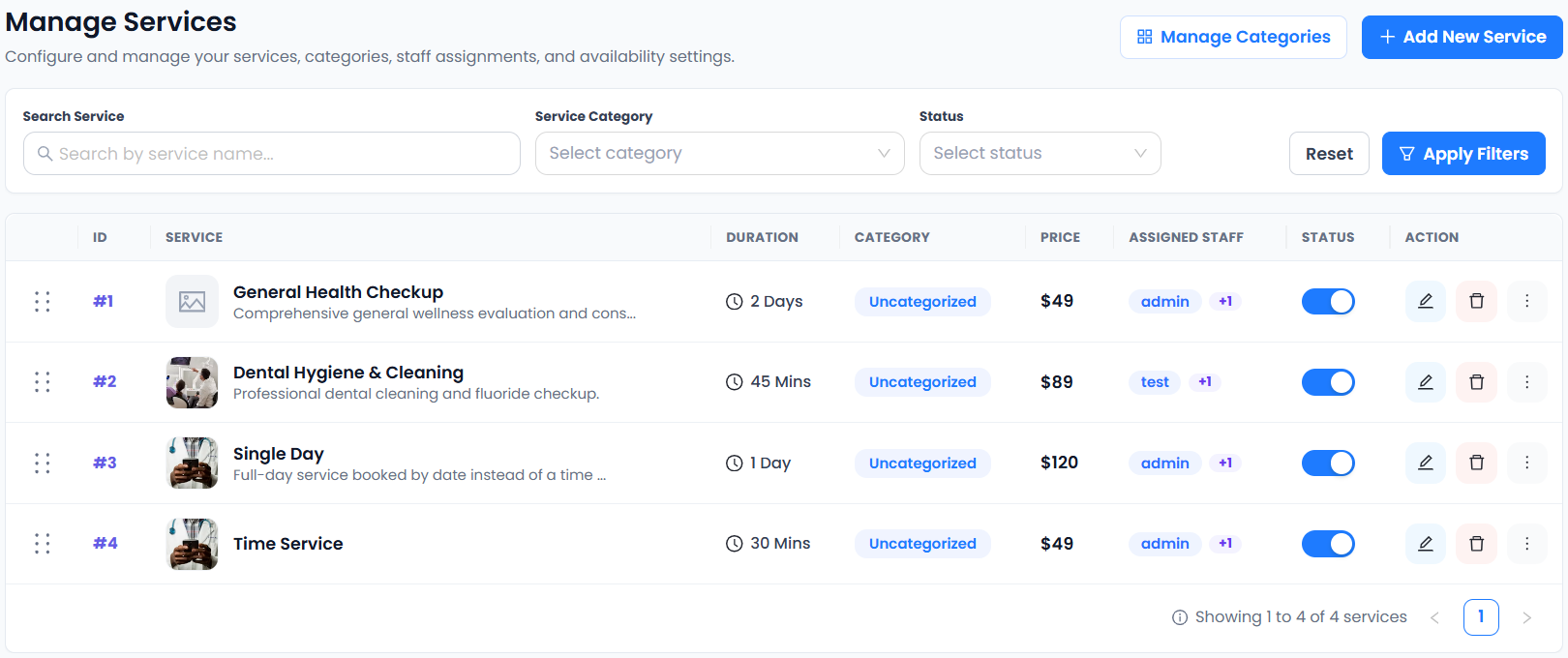
This actual service-management view demonstrates duration, price and staff assignment. It is an example workspace, not a group-booking screen. See which plan fits your workflow.
From choosing a service to making a booking.
- 01Choose a service
- 02Choose staff
- 03Choose a date & time
- 04Enter details & confirm
Spend your energy on the people you coach.
Give members an easier way to arrange their next session and keep staff availability visible. Choose appointment capacity that fits the volume of your training business.
Connect the tools your day depends on.


Availability varies by plan. Explore integrations →
Scheduling for fitness: a few things to know.
Can I offer one-to-one and group sessions?
Individual appointment booking is included in Free. Group Booking is included in paid plans. Test the group flow against your session requirements before publishing it.
Can trainers manage their own schedule?
Staff shifts and holidays are included in Free. The separate Staff Panel is included in Free. Confirm staff access settings as part of your setup.
Are unlimited staff the same as unlimited appointments?
No. Staff members and services are unlimited, but every plan has a monthly appointment limit. Compare the current limits on the pricing page.
Can I create online coaching meetings?
Zoom Meeting is available on paid plans and Google Meet in paid plans. Use a separate online-session service so members understand how the session will take place.
Can I use Price Rules on Free?
Yes. Price Rules is included in Free and all paid plans. Configure it for each service and save the service before testing a booking.
Can I vary class prices and send appointment updates?
Price Rules can set service prices for chosen days, times, dates or staff. Use approved WhatsApp templates for customer and staff appointment status updates. Both are included in Free and Paid; provider messaging charges may apply.