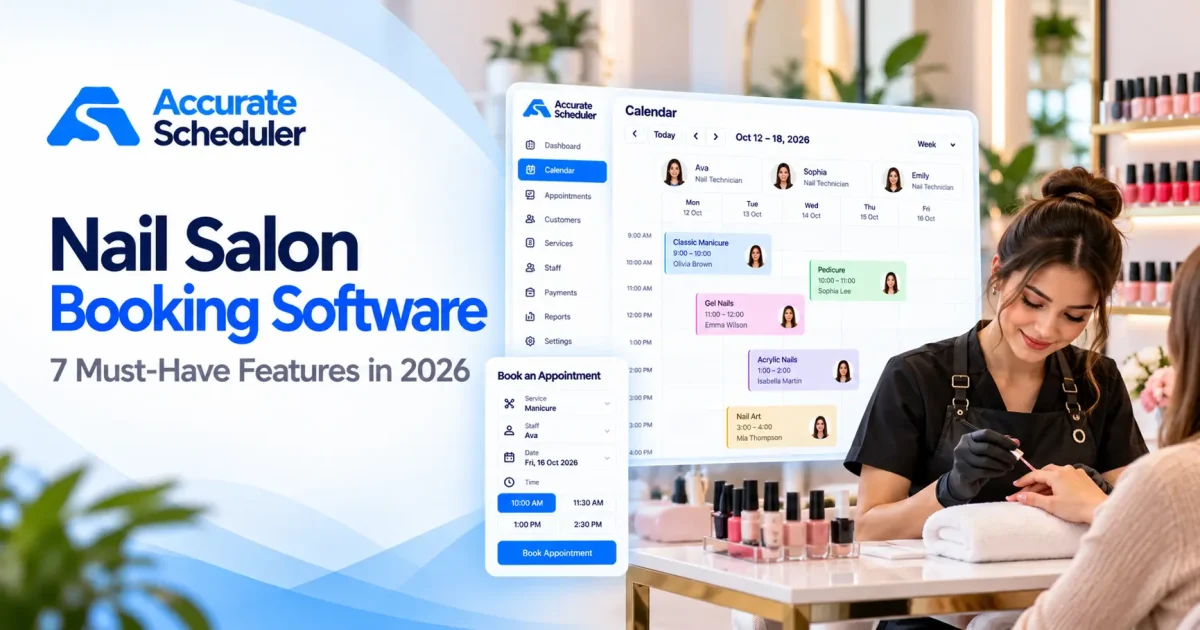
Choosing the right nail salon booking software can make everyday appointment management easier for nail technicians and salon owners. Whether you run a small manicure studio, work as an independent nail artist, or manage several technicians, your booking system affects how customers reserve services and how your team organizes its schedule.
Nail appointments are not all the same. A basic manicure might take 30 minutes, while acrylic extensions with detailed nail art can require two hours or longer.
Your scheduling system needs to account for these differences without creating overlapping appointments or confusing customers.
In this guide, we’ll explore seven essential features of nail salon booking software, explain what to consider before choosing a platform, and show how to set up online appointments for your nail business.
What Is Nail Salon Booking Software?
Nail salon booking software is an appointment scheduling system that helps nail salons manage customer reservations, technician availability, and service durations.
Instead of relying entirely on telephone calls, handwritten diaries, or social media messages, customers can book appointments through an online booking page.
A typical booking process includes:
- Selecting a nail service.
- Choosing an available nail technician.
- Reviewing appointment dates and times.
- Entering customer details.
- Completing the reservation.
The appointment is then recorded in the business’s scheduling calendar.
A nail salon booking system can be useful for independent nail artists, manicure studios, pedicure salons, beauty businesses, and multi-technician nail studios.
Why Nail Salons Need an Online Booking System
Nail salons often manage a mixture of short and long appointments.
A quick polish change may take only 20 minutes, while an acrylic full set can occupy a technician for much longer.
Without organized scheduling, salons can encounter overlapping reservations, incorrectly allocated appointment times, and confusion about technician availability.
Online booking software can help businesses:
- Accept appointments outside opening hours.
- Manage different nail service durations.
- Organize individual technician schedules.
- Display available booking slots.
- Maintain customer booking information.
- Handle appointment cancellations.
- Offer customers a mobile-friendly booking experience.
The right system should make booking straightforward for customers and scheduling manageable for your team.
1. Easy Online Nail Appointment Booking
Online booking is one of the most important features of nail salon booking software.
Customers should be able to reserve a manicure, pedicure, or nail treatment without needing to call your business.
What to Look For
Choose a system that provides:
- A mobile-friendly booking page.
- Clear service names and descriptions.
- Available appointment dates and times.
- Technician selection.
- Simple customer booking forms.
- An organized appointment calendar.
Example
Imagine a customer who wants to book a gel manicure on Saturday.
Instead of waiting until the salon opens, they can visit your booking page, select the treatment, choose a technician, and reserve an available appointment.
Accurate Scheduler provides hosted booking pages that businesses can share with customers.
Explore online appointment booking.
2. Flexible Nail Services and Appointment Durations
Every nail service requires a different amount of time.
Your nail salon scheduling software should allow you to configure individual service durations and prices.
Example Nail Salon Service Menu
| Service | Duration | Example Price |
|---|---|---|
| Classic Manicure | 30 minutes | $25 |
| Gel Manicure | 45 minutes | $40 |
| Classic Pedicure | 45 minutes | $45 |
| Acrylic Full Set | 120 minutes | $85 |
| Nail Art | 30 minutes | $25 |
| Gel Removal | 20 minutes | $15 |
Prices and durations are illustrative. Adjust them to reflect your actual services.
For example, a two-hour acrylic appointment should occupy the correct amount of time in the technician’s schedule.
If you offer nail art or removal as additional services, check whether your booking platform can represent those options correctly.
Accurate Scheduler supports configurable services and durations, with service extras available in supported paid plans.
3. Nail Technician Scheduling and Availability
A nail salon may have several technicians with different working hours and specializations.
Some technicians focus on acrylic extensions, while others provide manicures, pedicures, or nail art.
A good nail tech booking system should help you manage these differences.
Example Technician Schedule
| Technician | Specialization | Working Hours |
|---|---|---|
| Emma | Gel Manicure | Monday to Friday, 9 AM to 5 PM |
| Olivia | Acrylic Nails | Tuesday to Saturday, 10 AM to 7 PM |
| Sophia | Nail Art | Wednesday to Sunday, 11 AM to 6 PM |
Example schedule for illustration.
If Olivia is unavailable on Friday, customers should not be offered appointments with her during that time.
Important staff scheduling features include:
- Individual working hours.
- Holiday and time-off management.
- Service assignments.
- Accurate availability.
- A shared appointment calendar.
Accurate Scheduler supports unlimited staff members, staff shifts, holidays, and service assignments in its Free plan, subject to applicable booking limits.
Learn more about team scheduling.
4. Buffer Time Between Nail Appointments
Nail technicians often need preparation time between customers.
This may involve cleaning tools, sanitizing workstations, preparing equipment, or organizing materials for the next treatment.
Without buffer time, appointments may be scheduled too closely together.
Example
Suppose a gel manicure takes 45 minutes and the technician needs 10 minutes afterward.
The total occupied scheduling period is:
45-minute manicure + 10-minute buffer = 55 minutes
A booking system with buffer time functionality can help maintain more realistic availability.
Accurate Scheduler provides buffer time functionality in supported paid plans.
Read our guide to appointment buffer time.
5. Online Payments and Cancellation Options
Nail salons use different payment processes.
Some collect payment after the appointment, while others accept payment online.
Before choosing nail salon booking software, review the available payment options and cancellation settings.
Questions to Ask
- Which payment gateways are supported?
- Can customers pay online?
- Are payment processing fees charged separately?
- Can customers cancel bookings?
- Can customers reschedule appointments?
- Are booking policies clearly communicated?
Accurate Scheduler supports PayPal and Stripe integrations according to the relevant plan.
It also offers customer cancellation and paid rescheduling functionality.
If your business requires deposits, partial payments, or cancellation charges, verify those specific workflows before choosing a platform.
Explore payment features.
6. Customer Booking Management and Mobile Experience
Customers often discover nail salons through social media, Google Search, and local business profiles.
Your booking experience should work well on mobile devices.
A customer should be able to open your booking link, review services, and reserve an appointment without unnecessary steps.
Important Mobile Booking Features
- Readable service names.
- Simple technician selection.
- Clear calendar availability.
- Easy date and time selection.
- Short booking forms.
- Accessible booking information.
Accurate Scheduler provides mobile-friendly booking pages, appointment calendar management, and customer panel functionality.
What About Customer Preferences?
Some nail businesses need detailed records of preferred nail shapes, colors, previous treatments, or product sensitivities.
These requirements go beyond basic appointment scheduling.
If detailed customer preference records are essential, verify that your chosen software supports them appropriately.
7. Affordable Pricing for Nail Salons and Independent Technicians
Pricing is especially important for independent nail technicians and small salons.
However, the lowest advertised price is not always the best value.
Some booking platforms charge per technician, while others charge monthly subscriptions or additional fees for advanced features.
Common Pricing Models
| Pricing Model | What to Check |
|---|---|
| Free plan | Booking limits and included features |
| Monthly subscription | Recurring cost |
| Per-technician pricing | Cost as your team grows |
| Per-location pricing | Additional salon charges |
| Payment processing | Transaction fees |
| Paid add-ons | Additional feature costs |
Is Free Nail Salon Booking Software Enough?
A free booking system may be suitable for a solo nail technician or a small salon primarily needing appointment scheduling.
Accurate Scheduler offers a Free plan with online booking, unlimited staff members, and unlimited services, subject to applicable limits.
Businesses requiring additional scheduling capabilities can explore paid plans.
Review Accurate Scheduler pricing for current plan details.
Nail Salon Booking Software vs Complete Salon Management Software
Not every nail business needs a complete salon management platform.
Some businesses primarily need appointment scheduling, while others require retail inventory, point-of-sale transactions, staff commissions, or membership management.
| Capability | Booking Software | Full Salon Management Software |
|---|---|---|
| Online appointments | Core feature | Commonly included |
| Technician scheduling | Commonly included | Commonly included |
| Service durations | Core feature | Commonly included |
| Appointment calendar | Core feature | Commonly included |
| Online payments | Depends on platform | Commonly included |
| Retail inventory | Not always included | May be included |
| Point of sale | Not always included | May be included |
| Staff commissions | Not always included | May be included |
| Membership management | Not always included | May be included |
Choose software based on your actual operational needs rather than the number of features advertised.
Popular Nail Salon Booking Software Options
Several platforms serve nail salons and beauty professionals.
Accurate Scheduler
Accurate Scheduler focuses on online appointment booking, staff scheduling, service management, and payment integrations.
Its Free plan includes unlimited staff members and services, subject to applicable booking limits.
It may be suitable for nail salons primarily looking for a straightforward appointment booking system.
Fresha
Fresha serves beauty and wellness businesses with appointment booking and broader salon management functionality.
Booksy
Booksy offers booking and business management tools for beauty professionals, including nail technicians.
Vagaro
Vagaro provides scheduling alongside broader beauty and wellness business management features.
GlossGenius
GlossGenius focuses on independent beauty professionals and small businesses, combining booking with additional business tools.
Square Appointments
Square Appointments combines scheduling with Square’s payment ecosystem.
Each platform has different pricing structures and capabilities.
For a broader comparison, read Zenoti’s 2026 nail salon software guide.
How to Set Up Nail Salon Booking Software With Accurate Scheduler
You can establish a basic nail salon booking workflow through a few practical steps.
Step 1: Create Your Account
Visit Accurate Scheduler and select an appropriate plan.
Step 2: Add Your Nail Services
Create services such as classic manicures, gel manicures, pedicures, acrylic extensions, and nail art.
Configure the duration and price for each service.
Step 3: Add Your Nail Technicians
Create staff profiles and assign the services each technician provides.
Step 4: Configure Working Hours
Set individual shifts, holidays, and unavailable periods.
Step 5: Review Booking Settings
Check appointment availability, payment settings, cancellation policies, and any relevant buffer time.
Step 6: Test the Booking Experience
Create a test appointment on a mobile device.
Confirm that the correct service, technician, date, and time are recorded.
Step 7: Share Your Booking Link
Add your booking link to your website, social media profiles, and relevant business listings.
Customers can then access your online booking page directly.
Common Nail Salon Scheduling Mistakes to Avoid
Incorrect Service Durations
Acrylic extensions and detailed nail art often require more time than basic manicures.
Forgetting Preparation Time
Allow appropriate time for workstation cleaning and equipment preparation.
Overlapping Technician Schedules
Check individual working hours and holidays carefully.
Complicated Booking Forms
Ask only for information needed to complete the appointment.
Ignoring Mobile Users
Test the full booking process on smartphones.
Choosing Software Without Checking Operational Needs
If your salon requires inventory, point of sale, or staff commission management, confirm those capabilities separately.
Frequently Asked Questions About Nail Salon Booking Software
What is the best nail salon booking software for small businesses?
The best choice depends on your number of technicians, services, budget, and operational requirements. Accurate Scheduler is an option for businesses focused on online appointments and staff scheduling.
Is there free nail salon booking software?
Yes. Accurate Scheduler offers a Free plan with online booking, unlimited staff members, and unlimited services, subject to applicable limits.
Can customers book nail appointments online?
Yes. An online booking system allows customers to select nail services, available technicians, and appointment times.
Can I manage multiple nail technicians?
Yes. Accurate Scheduler supports multiple staff members, individual shifts, holidays, and service assignments.
Can nail salon booking software accept online payments?
Many platforms support online payments. Accurate Scheduler offers PayPal and paid Stripe functionality.
Can I add breaks between nail appointments?
Accurate Scheduler supports buffer time in relevant paid plans.
Do I need a website for nail salon online booking?
Not necessarily. Accurate Scheduler provides hosted booking pages that can be shared directly with customers.
Is nail salon booking software the same as salon POS software?
No. Appointment booking software focuses on scheduling. Point-of-sale software manages transactions and may include retail inventory and other in-store operations.
Final Thoughts: Choosing Nail Salon Booking Software
The right nail salon booking software should simplify appointment management for both customers and nail technicians.
Before choosing a platform, compare online booking, service durations, technician availability, buffer time, payment options, mobile usability, and pricing.
For independent nail technicians and small salons, Accurate Scheduler offers a Free starting point with additional paid scheduling capabilities.
Businesses requiring specialized inventory, POS, or commission management should evaluate those needs separately.
Ready to simplify your nail salon appointments?
Explore Accurate Scheduler or compare Free and Paid plans.
Set up your services, configure technician availability, and give customers a convenient way to book their next manicure or pedicure.