WhatsApp appointment booking is becoming an important part of how service-based businesses communicate with their customers. From hair salons and barbershops to yoga studios and consultants, businesses increasingly need convenient ways to connect with customers throughout the appointment booking process.
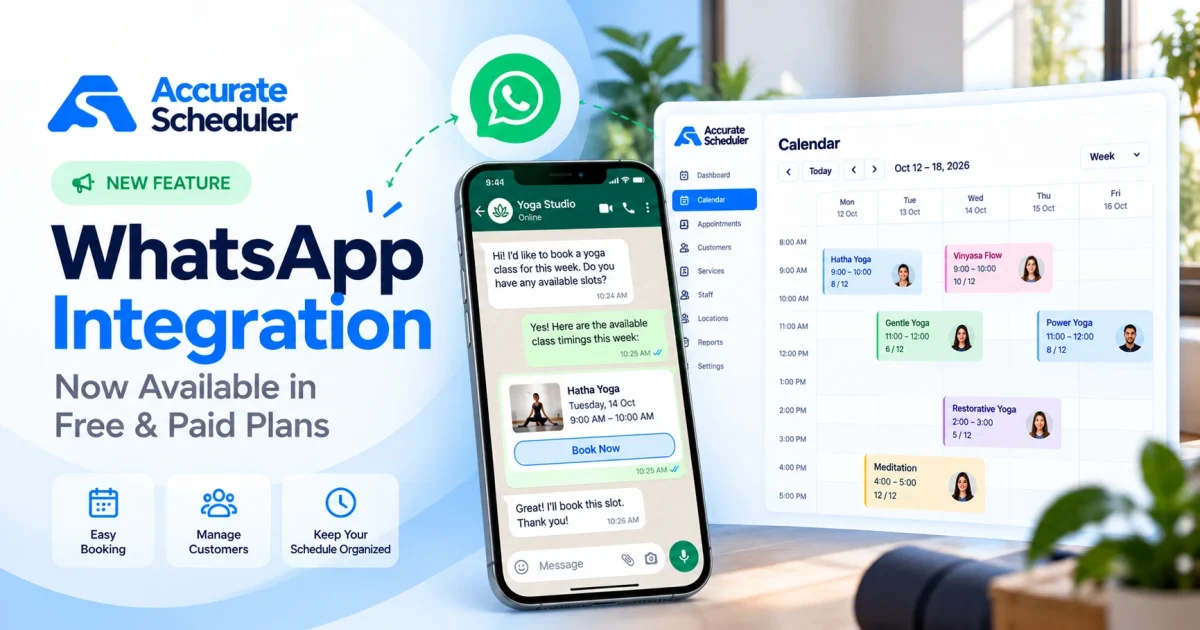
Accurate Scheduler has introduced a new WhatsApp integration feature, available in both Free and Paid plans, helping businesses connect WhatsApp communication with their existing appointment scheduling workflow.
Whether you manage a small business or a growing service team, this new feature gives you another way to use WhatsApp alongside your online booking system.
In this guide, we’ll explore the new WhatsApp feature, its benefits, supported plans, setup considerations, and how it fits into the Accurate Scheduler appointment management experience.
What Is WhatsApp Appointment Booking?
WhatsApp appointment booking refers to using WhatsApp as part of the process of communicating about, arranging, or managing appointments.
For example, a customer may contact a business through WhatsApp to ask about services, appointment availability, or booking requirements.
The business can then guide the customer toward its online booking page, where available services and time slots can be selected.
Depending on the integration, WhatsApp may also support other appointment-related communication workflows.
However, using WhatsApp with a booking system does not automatically mean customers can create appointments directly through a chat conversation.
Accurate Scheduler provides a dedicated online booking experience, with WhatsApp functionality available as an additional integration.
Introducing WhatsApp Appointment Booking in Accurate Scheduler
We’re introducing WhatsApp integration as part of Accurate Scheduler’s growing collection of appointment management features.
The goal is to make WhatsApp functionality accessible to businesses using the platform, without requiring them to purchase a paid subscription solely to access the feature.
The new WhatsApp feature is available in both Free and Paid plans.
This makes it relevant to businesses at different stages, including independent service providers, small teams, and businesses managing multiple staff members.
WhatsApp can complement your booking process while Accurate Scheduler continues to manage appointment availability, services, staff schedules, and customer bookings.
What’s New?
With this release:
- WhatsApp integration is available in Accurate Scheduler.
- The feature is included in both Free and Paid plans.
- Businesses can configure WhatsApp functionality within their scheduling setup.
- WhatsApp can be used alongside existing online appointment booking workflows.
- Businesses can continue managing their appointments through Accurate Scheduler.
The exact WhatsApp actions available depend on the configured integration and supported provider.
WhatsApp Appointment Booking Available in Free and Paid Plans
One of the most important aspects of this release is that WhatsApp functionality is not restricted to paid subscriptions.
| Feature | Free Plan | Paid Plans |
|---|---|---|
| WhatsApp integration availability | Yes | Yes |
| Online appointment booking | Yes | Yes |
| Staff scheduling | Yes | Yes |
| Service management | Yes | Yes |
| Customer appointment management | Yes | Yes |
| Advanced paid booking features | Depends on feature | Depends on plan |
Other appointment limits and plan-specific functionality continue to apply.
Additionally, any charges imposed by external WhatsApp service providers are separate from the availability of the Accurate Scheduler feature.
For up-to-date subscription information, visit Accurate Scheduler Pricing.
Why WhatsApp Appointment Booking Matters for Small Businesses
Customers may discover your business through Google Search, social media, your website, or recommendations.
Some customers are ready to reserve an appointment immediately. Others may have questions before choosing a service.
WhatsApp provides a familiar communication channel that can complement the booking process.
1. Convenient Customer Communication
Customers may prefer asking a quick question through WhatsApp instead of making a telephone call.
For example, someone booking a haircut may want to understand the difference between a standard haircut and a premium grooming service.
A WhatsApp conversation can help clarify the options before the customer completes a booking.
2. Supports the Online Booking Experience
WhatsApp and an online booking page can serve different purposes.
WhatsApp can support customer conversations, while Accurate Scheduler provides the appointment booking interface.
This distinction helps businesses maintain a clear reservation process.
3. Useful for Businesses With Multiple Services
Businesses often offer several appointment types with different durations, prices, and staff assignments.
Customers may need assistance selecting the correct service.
WhatsApp can provide an additional communication channel, while the booking system handles the appointment details.
4. Suitable for Small and Growing Teams
Independent professionals and businesses with several staff members can benefit from a consistent customer communication process.
Accurate Scheduler supports staff shifts, service assignments, and booking management, making it easier to organize the scheduling side of the business.
How WhatsApp Appointment Booking Works With Accurate Scheduler
The following example illustrates how WhatsApp communication can fit into an online booking workflow.
Step 1: Customer Contacts Your Business
A customer may contact your business through WhatsApp to ask about services or booking options.
Step 2: Share the Appropriate Booking Information
Your team can provide relevant information and direct the customer to your Accurate Scheduler booking page.
Step 3: Customer Selects a Service
The customer opens the booking page and chooses an available service.
For example, a barbershop customer might select a classic haircut or beard trim.
Step 4: Customer Chooses an Available Time
Accurate Scheduler displays booking availability according to the configured service and staff schedules.
The customer selects an appropriate date and time.
Step 5: Customer Completes the Appointment
The customer completes the booking through the supported Accurate Scheduler workflow.
The appointment can then be managed through the scheduling platform.
This example describes a practical combination of WhatsApp communication and online booking. It does not imply that WhatsApp automatically creates appointments or provides conversational chatbot booking.
How to Configure WhatsApp Integration in Accurate Scheduler
Before using the new feature, review the WhatsApp settings available in your Accurate Scheduler account.
Step 1: Sign In to Accurate Scheduler
Open your Accurate Scheduler workspace and sign in with your account credentials.
Step 2: Locate the WhatsApp Feature
Find the WhatsApp integration settings in the relevant configuration area.
The exact location may vary according to the current interface.
Step 3: Review Available Integration Options
Check which WhatsApp connection methods are supported by your workspace.
If an external provider is required, review its account requirements and any applicable service charges.
Step 4: Complete the Required Configuration
Enter the necessary connection details using the instructions provided in the integration settings.
Avoid sharing API credentials or sensitive configuration information publicly.
Step 5: Test the Supported Workflow
Test the functionality with your own business contact details before introducing it to customers.
Verify that the intended WhatsApp interaction works correctly and that appointment records remain accurate.
Step 6: Review Your Booking Experience
Open your booking page on desktop and mobile devices.
Check that customers can select services, staff members, dates, and available appointment times.
For more information about the booking system, explore Accurate Scheduler Features.
Industries That Can Benefit From WhatsApp Appointment Booking
WhatsApp can complement appointment scheduling across many service industries.
Hair Salons and Barbershops
Customers may have questions about haircut services, grooming packages, pricing, or barber availability.
Accurate Scheduler can manage appointment reservations while WhatsApp provides another communication channel.
Beauty Salons and Spas
Customers may want information about treatments, session durations, or service preparation before booking.
An online booking page helps organize available appointments.
Yoga and Fitness Studios
Students may ask about beginner classes, instructor availability, or session requirements.
A scheduling platform helps organize reservations and supported group booking workflows.
Consultants and Professional Services
Business consultants, financial advisors, and other professionals can use online appointment scheduling for consultations.
WhatsApp may provide a convenient channel for preliminary customer questions.
Education and Tutoring
Tutors and training providers can organize session availability through their booking system.
WhatsApp can complement their customer communication process.
Home Service Businesses
Cleaning services, repair professionals, and other service providers may use WhatsApp to discuss customer requirements before scheduling an appointment.
WhatsApp Integration and Other Accurate Scheduler Features
The new WhatsApp feature complements the platform’s existing appointment scheduling tools.
Online Appointment Booking
Customers can select services and available time slots through an online booking page.
Staff Scheduling
Manage individual staff shifts, holidays, and service assignments.
Learn more about Team Scheduling.
Customer Appointment Management
Keep customer booking information and appointment records organized within the scheduling system.
Online Payments
Accurate Scheduler supports payment integrations, including PayPal and Stripe, according to the relevant plan and configuration.
Explore Payment Features.
Appointment Calendar
Review scheduled appointments and staff availability through the booking calendar.
These features work together to support a more organized appointment management experience.
Best Practices for WhatsApp Appointment Booking
To make the most of WhatsApp alongside your scheduling system, follow these practical recommendations.
Keep your booking page accessible. Make it easy for customers to find the correct online booking link.
Use clear service descriptions. Customers should understand what each appointment includes before reserving a time.
Maintain accurate availability. Update staff schedules, holidays, and service durations when business hours change.
Use consistent customer communication. Provide clear information about services, pricing, and booking policies.
Protect customer privacy. Follow applicable privacy requirements and WhatsApp’s business messaging rules.
Test the integration before launch. Confirm that the supported functionality works as expected in your business configuration.
Frequently Asked Questions About WhatsApp Appointment Booking
Is WhatsApp appointment booking available in the Accurate Scheduler Free plan?
Yes. The new WhatsApp integration feature is available in both Free and Paid Accurate Scheduler plans.
Do I need to upgrade to use the WhatsApp feature?
No. Access to the newly introduced WhatsApp feature is not restricted to paid plans. Other plan limitations and any external provider charges may still apply.
Can I use WhatsApp with my existing appointment booking system?
Yes. Accurate Scheduler provides WhatsApp integration functionality that can be used alongside its online booking system, depending on the supported configuration.
Can customers book appointments directly through WhatsApp?
Direct conversational booking should not be assumed. The supported WhatsApp functionality depends on the integration and its configuration.
Is WhatsApp appointment booking suitable for salons?
Yes. Salons can use WhatsApp as a communication channel while managing appointment availability and reservations through Accurate Scheduler.
Can businesses with multiple staff members use the feature?
Yes. Accurate Scheduler supports multiple staff members and provides WhatsApp functionality in both Free and Paid plans.
Does the WhatsApp feature require an external account?
The requirements depend on the supported integration method. Review the WhatsApp configuration settings for the necessary provider credentials and account requirements.
Final Thoughts: WhatsApp Appointment Booking With Accurate Scheduler
The introduction of WhatsApp appointment booking functionality gives Accurate Scheduler users another way to connect customer communication with their scheduling workflow.
Most importantly, the new WhatsApp feature is available in both Free and Paid plans, making it accessible to small businesses and growing service teams.
Whether you run a barbershop, salon, yoga studio, consulting business, or another appointment-based service, Accurate Scheduler helps you organize bookings, staff schedules, and customer appointments.
Ready to explore the new WhatsApp feature?