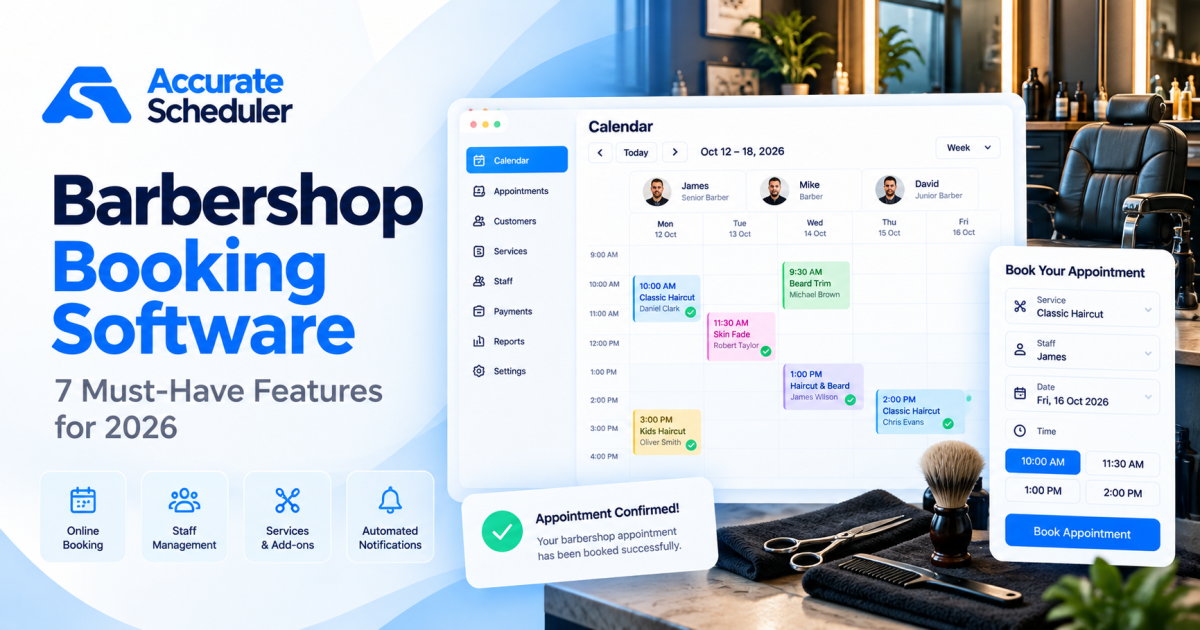
Running a successful barbershop involves more than delivering great haircuts. You also need to manage barber schedules, customer appointments, walk-ins, cancellations, and busy periods without creating unnecessary work for your team.
The right barbershop booking software helps customers reserve appointments online while giving barbershop owners a clearer view of their daily schedule.
Whether you operate a single-chair barbershop, a busy neighborhood shop, or a business with multiple barbers, choosing the right scheduling system can make your booking process more organized.
In this guide, we’ll explore seven essential features to look for in barbershop booking software, common scheduling challenges, and how to set up online appointments using Accurate Scheduler.
What Is Barbershop Booking Software?
Barbershop booking software is a digital appointment scheduling system that allows customers to reserve barber services online.
Instead of relying entirely on telephone calls, handwritten appointment books, or direct messages, customers can choose their preferred service, barber, date, and available time.
A typical booking process looks like this:
- The customer opens the barbershop’s booking page.
- They select a service, such as a haircut or beard trim.
- They choose an available barber.
- They select an appointment date and time.
- They provide contact details and confirm the booking.
The appointment is then recorded in the scheduling system according to the booking workflow.
For shop owners, this creates a central place to review bookings and staff availability.
Why Barbershops Need Online Appointment Booking in 2026
Customer convenience is an important reason to offer online booking.
Customers may want to book a haircut after working hours, during a commute, or while browsing a barbershop’s Instagram profile.
An online booking page lets them check available appointments without waiting for a telephone response.
Industry research also suggests that online booking remains important for barbershops. According to Zenoti’s 2026 barbershop industry analysis, top-performing barbershops received 68% of bookings online, compared with a 36% median.
Source: Zenoti Barbershop Trends 2026.
These figures describe the businesses in that benchmark, not a guaranteed result for every barbershop.
Benefits of Barbershop Scheduling Software
A well-configured booking system can help your business:
- Accept online appointments outside opening hours.
- Reduce the number of routine scheduling calls.
- Organize individual barber availability.
- Give customers clearer service choices.
- Keep confirmed appointments in one calendar.
- Manage cancellations and rescheduling.
- Make busy periods easier to plan.
However, software alone does not solve every scheduling problem. Your team still needs accurate working hours, realistic service durations, and a consistent process for handling walk-ins.
7 Essential Barbershop Booking Software Features
Before choosing a platform, compare these seven capabilities against your actual business needs.
1. Online Appointment Booking Available 24/7
Customers should be able to request or complete appointments even when your barbershop is closed.
A mobile-friendly booking page is especially useful because customers often discover local barbershops through search engines, social media, and recommendations.
For example, a customer looking for a haircut on Friday evening should be able to view available Saturday appointments without calling your shop.
Look for software that offers:
- A simple customer booking page.
- Mobile-friendly service selection.
- Clear available dates and times.
- A straightforward confirmation process.
- A booking link you can share on your website and social profiles.
Accurate Scheduler offers hosted online booking pages and a mobile-friendly booking experience.
Explore its online booking features.
2. Individual Barber Schedules and Availability
Every barber may work different hours.
One barber might work Tuesday through Saturday, while another works evenings or weekends.
If your booking software treats every barber as available at the same time, customers may select appointments that your team cannot fulfill.
Good barbershop booking software should let you manage individual staff schedules.
For example:
| Barber | Working Days | Working Hours |
|---|---|---|
| James | Monday to Friday | 9:00 AM to 5:00 PM |
| Michael | Tuesday to Saturday | 10:00 AM to 7:00 PM |
| Daniel | Friday to Sunday | 11:00 AM to 6:00 PM |
Example schedules for illustration.
You should also be able to account for holidays, breaks, and planned time off.
Accurate Scheduler supports unlimited staff members, individual shifts, holidays, and service assignments, subject to plan appointment limits.
Read more about staff scheduling and availability.
3. Flexible Haircut and Grooming Service Durations
Not every barbershop service takes the same amount of time.
A basic haircut may take 30 minutes, while a haircut and beard trim may require 45 minutes or longer.
If every service uses the same appointment duration, your calendar can become inaccurate.
Here is an example service menu:
| Service | Example Duration | Example Price |
|---|---|---|
| Classic Haircut | 30 minutes | $25 |
| Skin Fade | 40 minutes | $35 |
| Beard Trim | 20 minutes | $15 |
| Haircut and Beard Trim | 50 minutes | $45 |
| Premium Grooming | 60 minutes | $60 |
Illustrative prices and durations. Configure your own services according to your business.
Your booking system should reserve enough time for the selected service.
It is also worth considering preparation and cleanup time between customers.
For example, if a haircut takes 30 minutes and your barber needs another five minutes to prepare the chair, the schedule should account for that additional time.
Accurate Scheduler supports service durations and buffer settings, helping businesses configure realistic booking availability.
4. Customer Cancellations and Rescheduling
Customers sometimes need to change appointments because of work, travel, or personal commitments.
Without a clear cancellation or rescheduling process, your staff may spend unnecessary time updating bookings manually.
Look for software that allows customers to manage their appointments while respecting your business policies.
Useful capabilities include:
- Customer appointment cancellation.
- Appointment rescheduling.
- Clear booking policies.
- Updated appointment records.
- Customer access to booking information.
Accurate Scheduler provides a customer panel, cancellation controls, and rescheduling functionality.
Your business should define how much notice customers must give before changing or cancelling an appointment.
For example, a shop might request at least 12 hours’ notice, but the appropriate policy depends on your business and local requirements.
5. Appointment Reminders and Customer Notifications
Missed appointments can create empty chairs and reduce the time available for paying customers.
Appointment reminders can help customers remember upcoming bookings.
Depending on the platform, notifications may be delivered through email, SMS, or other supported channels.
Before selecting a booking system, check:
- Whether booking confirmations are available.
- Whether scheduled reminders are supported.
- Which delivery channels are included.
- Whether additional messaging fees apply.
- Whether notification templates can be customized.
Accurate Scheduler includes scheduled notification functionality. Confirm the delivery channels and configuration available in your workspace before setting customer expectations.
For additional ideas, read our guide on how to reduce appointment no-shows.
6. Online Payments and Booking Policies
Some barbershops prefer customers to pay after their haircut. Others accept advance payments or require a deposit for longer services.
The right payment process depends on your business model.
When comparing barbershop booking software, consider:
- Supported payment providers.
- Pay-now and pay-later workflows.
- Cancellation policies.
- Refund procedures.
- Payment transaction fees.
- Whether partial deposits are supported.
Accurate Scheduler supports PayPal and Stripe payments.
Before advertising deposits or partial payments, verify the exact payment workflow supported by your selected configuration.
Learn more about Accurate Scheduler payment features.
7. One Organized Appointment Calendar
A clear appointment calendar helps your team understand the day ahead.
For example, a barbershop owner may need to answer these questions quickly:
- Which barber has the next appointment?
- How many haircuts are scheduled this afternoon?
- Are there any available slots?
- Which appointments have been cancelled?
- Can a walk-in customer be accommodated?
Your booking calendar should make this information easy to review.
Accurate Scheduler provides booking calendar management alongside staff schedules and appointment details.
Explore the booking calendar features.
Walk-Ins vs Online Appointments: Which Is Better for Barbershops?
Many barbershops depend on both appointments and walk-in customers.
Online appointments give customers a reserved time. Walk-ins provide flexibility for people who need a haircut without booking ahead.
Neither approach is automatically better for every shop.
| Factor | Online Appointments | Walk-In Customers |
|---|---|---|
| Customer planning | Reserve a time in advance | Visit without advance booking |
| Waiting time | Usually more predictable | Depends on current demand |
| Staff planning | Appointments visible ahead of time | Demand can be less predictable |
| Convenience | Customers can book online | Useful for spontaneous visits |
| Busy periods | Helps organize demand | May create queues |
A Practical Hybrid Booking Strategy
Consider reserving part of your schedule for online appointments while leaving appropriate capacity for walk-ins.
For example, a three-barber shop could use a combination of scheduled appointments and walk-in availability based on its customer demand.
However, do not assume that every scheduling platform includes a dedicated walk-in queue.
If you use Accurate Scheduler, confirm how manual bookings and walk-in appointments will be entered into your workspace. A real-time walk-in queue, chair rental management, and commission payroll should not be assumed to be included.
The important goal is to avoid promising the same barber and time slot to two customers.
How to Set Up Barbershop Booking Software with Accurate Scheduler
You can organize a basic barbershop booking workflow using these seven steps.
Step 1: Create Your Accurate Scheduler Account
Visit Accurate Scheduler and create an account.
Review the available plans and appointment limits before setting up your shop.
Step 2: Add Your Barbershop Services
Create services such as:
- Classic Haircut.
- Skin Fade.
- Beard Trim.
- Haircut and Beard Trim.
- Premium Grooming.
For each service, configure its name, duration, price, and relevant booking settings.
Step 3: Add Your Barbers
Create a staff profile for each barber.
Assign the appropriate services to each person.
If some barbers specialize in particular services, make sure customers only see valid staff and service combinations.
Step 4: Configure Working Hours
Set each barber’s shifts and unavailable periods.
Review opening and closing times carefully.
Test at least one weekday and one weekend date to ensure the booking page reflects the intended schedule.
Step 5: Configure Payments and Booking Rules
Choose the payment options supported by your workspace.
Review cancellation settings, appointment durations, and buffer time.
Keep customer-facing policies clear.
Step 6: Customize Your Booking Page
Add your barbershop name, branding, and relevant business information.
Review the booking experience on desktop and mobile.
A simple booking page should help customers understand what they are booking without unnecessary steps.
Step 7: Test and Share Your Booking Link
Complete a test appointment before inviting real customers.
Verify the selected service, barber, date, time, payment information, and resulting appointment record.
Then share your booking link through:
- Your barbershop website.
- Instagram profile.
- Google Business Profile, where supported.
- Email communications.
- Printed QR codes.
For a visual example, explore the Accurate Scheduler Hair Salon Demo. This is a related beauty-industry booking example, not a dedicated barbershop demo.
Common Barbershop Booking Mistakes to Avoid
Even good scheduling software needs accurate configuration.
Using Unrealistic Appointment Durations
If a service regularly takes 45 minutes, configuring it for 30 minutes can cause delays throughout the day.
Review actual service times with your barbers.
Forgetting to Update Staff Holidays
Customers should not see bookable slots for staff members who are unavailable.
Keep holiday and shift information current.
Ignoring Walk-In Appointments
If your team accepts walk-ins, record their occupied time consistently so online customers are not offered conflicting availability.
Making the Booking Process Too Complicated
Customers should be able to choose a service and time without filling in unnecessary information.
Only request details you actually need.
Failing to Test Mobile Booking
Customers may discover your shop on a phone and expect to complete the booking on that device.
Test the entire customer journey, not just the booking page design.
Choosing Software Based Only on Price
A free plan may be enough for a small shop, but appointment allowances and required integrations can affect the total cost as your business grows.
Review features, limits, and the actual booking experience before choosing a plan.
How Much Does Barbershop Booking Software Cost?
Barbershop scheduling software may use free plans, monthly subscriptions, usage limits, or additional charges for certain features.
The cost depends on the platform and your requirements.
For a small barbershop, consider:
| Business Requirement | What to Check |
|---|---|
| One barber | Monthly appointment allowance |
| Multiple barbers | Staff limits and availability management |
| Online payments | Payment providers and transaction fees |
| Customer reminders | Notification channels and charges |
| Calendar synchronization | Integration availability |
| Business growth | Higher booking-volume plans |
Accurate Scheduler offers a Free plan and paid options.
Its Free plan includes unlimited staff and services, but monthly appointment limits apply.
Check the current pricing plans for the latest appointment allowances and features.
Frequently Asked Questions About Barbershop Booking Software
What is the best barbershop booking software for a small business?
The best choice depends on your shop’s size, booking volume, staff schedules, and payment needs. Accurate Scheduler is an option for appointment-focused barbershops. Businesses requiring specialized walk-in queues, chair rentals, POS inventory, or commission payroll should verify those capabilities separately.
Can customers book barber appointments online?
Yes. Online scheduling software allows customers to select a service, available barber, date, and time through a booking page.
Is there free barbershop booking software?
Yes. Some platforms offer free appointment scheduling plans. Accurate Scheduler offers a Free plan with unlimited staff and services, subject to appointment and customer limits.
Can I manage multiple barbers in one booking system?
Yes. Accurate Scheduler supports multiple staff members, individual shifts, holidays, and service assignments.
Can customers cancel or reschedule barber appointments?
Accurate Scheduler supports customer cancellation and appointment rescheduling. Configure your booking policies and test the customer workflow before launch.
Can I accept walk-ins and online appointments together?
Yes, a barbershop can operate a hybrid model. The key is recording occupied staff time consistently. A dedicated walk-in queue is a separate feature and should not be assumed.
Do I need a website to accept barber appointments?
Not necessarily. A hosted booking page allows customers to access your scheduling experience through a shared link. You can also connect booking access from your existing website or social profiles.
Final Thoughts: Choose Barbershop Booking Software That Fits Your Shop
The right barbershop booking software should make appointments easier for customers and scheduling clearer for your team.
Start by identifying your daily challenges. Are customers struggling to book outside opening hours? Are barber schedules difficult to coordinate? Do cancellations create confusion? Are walk-ins and online appointments competing for the same availability?
Then choose software that solves those specific problems.
For barbershops focused on online appointments, staff scheduling, customer management, and booking payments, Accurate Scheduler offers a flexible scheduling workspace.
Ready to simplify your barbershop appointments?
Explore Accurate Scheduler and compare the available plans.
Set up your services, add your barbers, configure availability, and test your customer booking experience before going live.