
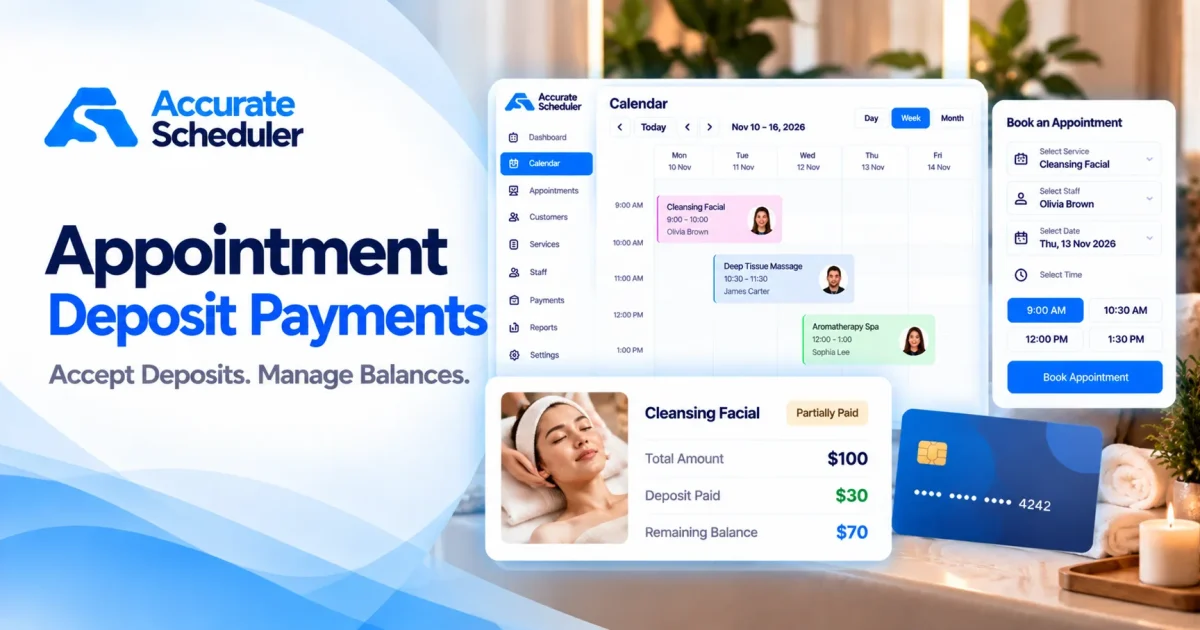
Managing appointments involves more than choosing available dates and times. Every reservation can require staff time, preparation, equipment, or materials.
When customers cancel at the last minute or fail to attend, businesses may lose valuable appointment time and revenue.
Appointment deposit payments offer a practical way to collect part of a service’s price when a customer books online.
Instead of requiring full payment upfront, you can request a fixed amount or percentage and collect the remaining balance later.
With Accurate Scheduler’s Deposit Payment feature, businesses can configure deposit options for individual services, manage partial payments, and track outstanding balances.
In this guide, you’ll learn how appointment deposits work, which deposit types are available, how to configure deposits in Accurate Scheduler, and how customers can pay their remaining balances.
What Are Appointment Deposit Payments?
Appointment deposit payments are upfront payments collected when customers reserve a service.
A deposit can represent part of the total appointment price or, depending on the configuration, a separate refundable security guarantee.
For example, imagine a customer books a spa treatment costing $100.
The business requests a $30 deposit during online booking.
| Payment detail | Amount |
|---|---|
| Total appointment price | $100 |
| Deposit paid online | $30 |
| Remaining balance | $70 |
The customer pays $30 upfront and settles the remaining $70 later.
This allows the business to collect an advance payment without necessarily requiring the customer to pay the entire service price immediately.
Appointment deposit payments can be useful for hair salons, spas, photography studios, tattoo artists, coaches, and other appointment-based businesses.
7 Benefits of Accepting Appointment Deposit Payments
1. Encourage Greater Booking Commitment
When customers pay a deposit, they have a financial commitment to their reservation.
This may discourage casual bookings and reduce some last-minute cancellations.
However, deposits do not guarantee attendance or eliminate no-shows.
2. Collect Revenue Before the Appointment
Certain services require advance preparation.
A hair coloring appointment may require products and dedicated stylist time. A photography session may involve studio preparation and equipment.
Collecting a deposit allows the business to receive part of the expected payment before delivering the service.
3. Offer Flexible Payment Options
Not every customer wants to pay the full appointment price immediately.
Partial deposit payments can provide an alternative.
For example, a customer booking a $200 service could pay $50 now and $150 later.
Where the checkout flow supports it, customers may also choose to pay the full amount upfront.
4. Protect Time Reserved for Premium Services
Longer appointments can be difficult to replace when customers cancel shortly before their scheduled time.
Businesses offering bridal makeup, tattoo sessions, premium spa treatments, or photography packages may benefit from an appropriate deposit policy.
Choose deposit amounts that reflect the service and clearly explain the applicable cancellation terms.
5. Track Outstanding Appointment Balances
Collecting a deposit is only the first part of the payment process.
Businesses also need to know how much remains payable.
Accurate Scheduler’s documented Deposit Payment workflow supports payment status tracking and outstanding-balance management.
6. Set Different Deposit Rules for Different Services
A short introductory consultation may not need an advance payment, while a premium service might require one.
Accurate Scheduler allows businesses to configure deposit options at the service level.
This makes it possible to use different payment approaches for different appointment types.
7. Provide Clearer Payment Expectations
Customers should understand what they are paying now and what they will owe later.
A transparent deposit policy can reduce confusion about service prices, payment timing, and cancellation conditions.
Types of Appointment Deposit Payments in Accurate Scheduler
Accurate Scheduler’s Deposit Payment feature includes several configuration options.
Each serves a different purpose.
1. Partial Deposit
A partial deposit allows the customer to pay part of the appointment price upfront.
Example:
- Service price: $120
- Deposit: $30
- Remaining balance: $90
For supported checkout flows, customers may be able to choose between paying the deposit and paying the full amount.
Suitable for: Salons, spas, photography studios, and businesses offering higher-priced services.
2. Mandatory Deposit
A mandatory deposit requires an upfront payment in the applicable online payment flow.
Example:
A photography studio charges $200 for a session and requires a $50 deposit.
The customer pays $50 upfront and the remaining $150 later.
Suitable for: Premium services, longer appointments, and services involving advance preparation.
A supported online payment gateway must be configured for online deposit collection. The business should verify the checkout behavior before relying on mandatory deposits.
3. Refundable Security Deposit
A refundable security deposit is different from a normal partial payment.
In a supported payment-provider flow, a temporary authorization hold can be placed on the customer’s card.
Depending on the provider, payment method, and applicable rules, the hold may be released or an eligible amount captured.
Example:
A business requests a $50 security authorization for a booking involving equipment or reserved resources.
The authorization is separate from the regular service payment.
Suitable for: Businesses requiring a refundable guarantee.
Important: Authorization holds are provider-dependent and time-limited. Accurate Scheduler includes this configuration, but businesses must verify that their chosen gateway supports the required authorization, capture, and release workflow before using it.
4. Non-Refundable Deposit
A non-refundable deposit is an advance payment subject to a disclosed cancellation and refund policy.
Example:
A salon requests a $40 deposit for a premium bridal makeup appointment.
The salon clearly explains the circumstances under which the deposit may be retained.
Suitable for: Services involving substantial preparation, reserved resources, or limited availability.
A non-refundable label does not override consumer protection laws or payment-provider rules. Businesses should ensure their terms are lawful and clearly communicated.
5. No Deposit
Not every appointment needs advance payment.
Businesses can disable deposit collection for services where it is unnecessary.
This may be suitable for short consultations, introductory appointments, or services normally paid for on arrival.
Fixed Deposit vs Percentage Deposit: Which Should You Choose?
Accurate Scheduler supports fixed and percentage-based deposit configurations.
Fixed Deposit
A fixed deposit is a specific amount.
For example:
- Appointment price: $150
- Fixed deposit: $40
- Remaining balance: $110
Fixed deposits are straightforward for customers to understand.
They may be appropriate when services have similar prices.
Percentage Deposit
A percentage deposit is calculated from the applicable booking amount.
For example:
- Appointment price: $200
- Deposit percentage: 25%
- Deposit collected: $50
- Remaining balance: $150
Percentage deposits may be more convenient when appointment prices vary.
Deposit Comparison
| Business requirement | Suggested approach |
|---|---|
| Services with similar prices | Fixed deposit |
| Services with different prices | Percentage deposit |
| Premium appointments | Mandatory deposit |
| Refundable guarantee | Security deposit, where supported |
| Advance preparation costs | Clearly disclosed non-refundable deposit |
| Simple introductory consultation | No deposit |
These are general starting points. Your actual deposit policy should reflect service costs, customer expectations, and applicable laws.
How to Set Up Appointment Deposit Payments in Accurate Scheduler
Accurate Scheduler provides service-level Deposit Payment settings.
Follow these steps to configure deposits for eligible bookings.
Step 1: Activate the Deposit Payment Feature
Sign in to your Accurate Scheduler dashboard.
Open the feature management area.
Find Deposit Payment and select Activate.
Screenshot placement: Deposit Payment feature activation card.
Step 2: Open the Service Settings
Navigate to Services.
Choose the service for which you want to collect a deposit and open its editing screen.
For example, select a service named Cleansing Facial.
Find the section labeled Configure Deposit options for the service.
Screenshot placement: Service editing page showing deposit settings.
Step 3: Select a Deposit Type
Choose the appropriate deposit configuration:
- No deposit
- Partial deposit
- Mandatory deposit
- Security deposit (refundable hold)
- Non-refundable deposit
Select the option that matches your service and payment policy.
Screenshot placement: Deposit type dropdown.
Step 4: Set the Deposit Amount
For supported deposit types, choose either a fixed amount or a percentage.
Fixed amount: Enter the specific amount you want customers to pay.
Percentage: Enter a percentage from 0 to 100, subject to the applicable validation rules.
Accurate Scheduler’s documented calculation workflow determines the deposit from the final booking amount, including supported service extras, quantities, price rules, and coupons.
The calculation is performed on the server rather than relying on a customer-editable payment amount.
Screenshot placement: Fixed and percentage deposit configuration.
Step 5: Configure a Supported Payment Gateway
Open Settings → Payments.
Configure a supported online payment gateway, such as Stripe or PayPal, for the applicable payment flow.
Payment capabilities differ by gateway and deposit type.
In particular, refundable authorization holds require a compatible provider and payment method.
If an online gateway is unavailable, review any warnings displayed in the deposit settings.
Important: Selecting Pay on Arrival does not mean an online deposit has been collected.
Step 6: Save the Service
Click Save Service.
The configured deposit settings will apply to eligible future bookings for that service.
Step 7: Test the Customer Booking Flow
Before using the feature with real customers, complete a test booking.
Check that:
- The correct service price appears.
- The required deposit amount is calculated correctly.
- Available payment options match the configuration.
- The payment status reflects the actual transaction.
- The remaining balance is accurate.
For payment-provider-dependent deposit types, test the specific supported workflow rather than assuming all gateways behave the same way.
How Customers Pay Deposits During Online Booking
The customer payment experience depends on the selected deposit type and available payment methods.
For an eligible partial deposit booking, customers may see two options.
Pay Deposit
The customer pays the configured deposit amount and settles the remaining balance later.
Pay Full Amount
The customer pays the complete appointment price during booking.
Once a partial payment is successfully collected, the appointment can display a Partially Paid payment status.
When the full applicable amount has been received, the booking reflects completed payment.
The available options depend on the configured deposit rules and supported checkout flow.
How to Collect the Remaining Appointment Balance
A useful appointment deposit payment system should help businesses collect the remaining amount after the initial deposit.
Accurate Scheduler’s documented feature includes three balance collection methods.
Option 1: Send a Remaining Payment Link
Open the appointment’s Payment panel.
Choose Send remaining payment link.
Use the available Copy, Email, or Open action to access or share the payment page.
The documented payment-link flow uses a signed, time-limited, single-use link, with the payable amount determined on the server.
This provides a way for customers to pay an eligible outstanding balance online.
Option 2: Customer Pays Through My Bookings
Customers can open My bookings.
For an eligible appointment, they can select Pay remaining.
They can then complete the payment using an available supported online payment method.
Option 3: Record a Cash Payment
If a customer settles the outstanding amount at the business, open the appointment’s Payment panel.
Choose:
Take payment → Cash
Record the received amount against the outstanding balance.
Example: Completing an Appointment Payment
A customer books a service costing $150 and pays a $45 deposit.
| Payment detail | Amount |
|---|---|
| Total appointment price | $150 |
| Deposit received | $45 |
| Outstanding balance | $105 |
| Additional payment | $105 |
| Final outstanding balance | $0 |
Once the applicable amount has been fully paid, the booking shows Paid in full.
Which Businesses Benefit From Appointment Deposit Payments?
Hair Salons and Beauty Studios
Salons may collect deposits for hair coloring, bridal styling, facials, and longer appointments.
Spa and Wellness Centers
Spas can use partial deposits for premium treatment packages and longer wellness sessions.
Photography Studios
Photographers may request advance payments for portrait sessions, studio reservations, or other scheduled services.
Tattoo Studios
Tattoo artists can use deposit payments for consultations and longer sessions, subject to their booking policies.
Fitness and Coaching Businesses
Personal trainers and coaches may collect deposits for private sessions or scheduled consultations.
Professional Service Providers
Consultants and other professionals may request advance payments for time-intensive appointments.
The right deposit configuration depends on the type of service and how the business manages payment collection.
Best Practices for Appointment Deposit Policies
Display Deposit Amounts Clearly
Customers should know the upfront payment amount before completing checkout.
Explain When the Remaining Balance Is Due
Clearly state whether customers pay the rest online, at the business, or through another supported method.
Make Cancellation and Refund Terms Accessible
Explain how cancellations affect deposits and when refunds may apply.
Choose Reasonable Deposit Amounts
Consider appointment duration, preparation costs, and customer expectations.
Verify Your Payment Gateway
Test partial payments and any special payment flows using the configured provider.
Keep Payment Records Accurate
Record deposits, additional payments, and outstanding balances consistently.
Review Applicable Legal Requirements
Deposit and refund policies may be subject to consumer protection requirements in the countries where you operate.
Frequently Asked Questions About Appointment Deposit Payments
What are appointment deposit payments?
Appointment deposit payments are upfront amounts collected when customers reserve a service. They may represent part of the service price or, in supported cases, a separate security guarantee.
Can I collect only part of an appointment payment?
Yes. Accurate Scheduler supports partial deposit configurations, allowing customers to pay an upfront amount and settle the remaining balance later.
Can I set different deposits for different services?
Yes. Deposit settings are configured individually for services.
Can I use a percentage instead of a fixed amount?
Yes. Supported deposit configurations allow fixed or percentage-based amounts.
Can customers pay the full appointment price instead?
For supported partial deposit checkout flows, customers can choose between paying the deposit and paying the full amount.
Can customers pay their remaining balance later?
Yes. Eligible balances can be paid through supported online payment links, the customer booking panel, or recorded cash payments.
Does Accurate Scheduler support refundable security deposits?
Accurate Scheduler includes a refundable security deposit configuration. Actual authorization, capture, and release capabilities depend on the supported payment provider and flow.
Do booking deposits prevent no-shows?
Deposits may encourage customers to take appointments more seriously, but they cannot guarantee attendance.
Do I need Stripe or PayPal to collect deposits?
A supported online payment provider must be configured for applicable online deposit collection. The exact available functionality depends on the payment gateway and deposit type.
Can I use deposit payments for different industries?
Yes. Deposit configurations can be useful for salons, spas, photography studios, tattoo businesses, coaches, and other appointment-based services.
Start Accepting Appointment Deposit Payments With Accurate Scheduler
Appointment deposit payments can help service businesses collect advance payments, organize outstanding balances, and provide customers with more flexible payment options.
With Accurate Scheduler’s Deposit Payment feature, businesses can configure service-level deposits, choose fixed or percentage amounts, track partial payments, and manage eligible remaining-balance collections.
Whether you run a salon, spa, photography studio, or consulting business, a clearly defined deposit policy can make your booking and payment process more structured.
Ready to accept deposit payments for online appointments?
Start Free With Accurate Scheduler
Explore the Deposit Payment feature, configure your services, and choose the payment options that fit your business.