Running a photography business involves more than taking great photographs. You also need to manage client inquiries, schedule photo sessions, coordinate photographers, and organize your availability.
The right photography booking software makes it easier for clients to schedule photography sessions online while helping photographers manage their daily calendars.
Whether you specialize in portraits, family photography, professional headshots, product photography, or studio sessions, an organized booking process can improve your customer experience.
But not every booking platform is designed for the same business needs.
Some focus on appointment scheduling, while others combine contracts, invoicing, client galleries, and project management.
In this guide, we’ll explore seven essential photography booking software features, explain the difference between scheduling tools and photography management platforms, and show how to set up online bookings for your photography business.
What Is Photography Booking Software?
Photography booking software is a scheduling system that helps photographers and studios organize client appointments, photography sessions, and availability.
Instead of relying entirely on emails, phone calls, or social media messages, clients can book available sessions through an online booking page.
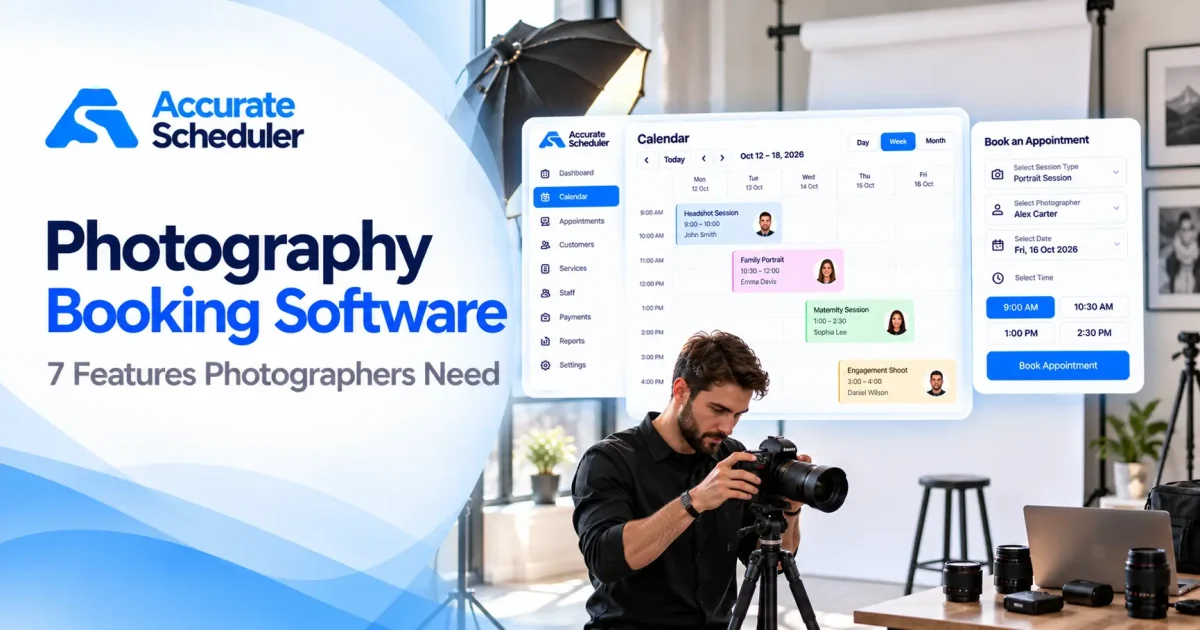
A typical photography booking process includes:
- Selecting a photography service.
- Choosing an available photographer.
- Reviewing available dates and times.
- Entering booking information.
- Completing the appointment reservation.
The session is then recorded in the business’s booking calendar.
Photography scheduling software is useful for portrait photographers, family photography studios, headshot photographers, maternity photographers, and other businesses offering bookable sessions.
For complex wedding or commercial projects, an initial consultation may be more appropriate than allowing customers to reserve a full project directly.
Why Photographers Need Online Booking Software
Photography businesses often manage several appointment types.
A professional headshot may take 30 minutes, while a family portrait session can require an hour or longer.
Some studios also coordinate multiple photographers with different schedules.
Without an organized booking process, businesses can encounter overlapping appointments, inaccurate session durations, and confusion about availability.
Online booking software can help photographers:
- Accept session bookings outside business hours.
- Manage different photography services.
- Organize individual photographer schedules.
- Display available appointment times.
- Maintain customer booking information.
- Handle cancellations and appointment changes.
- Provide a mobile-friendly booking experience.
The best approach depends on the type of photography business you operate.
1. Easy Online Photography Session Booking
Online booking is one of the most important features of photography booking software.
Clients should be able to reserve available sessions without waiting for a response to an email or social media message.
What to Look For
Choose a booking platform that offers:
- Mobile-friendly booking pages.
- Clear photography service descriptions.
- Available appointment dates and times.
- Photographer selection where needed.
- Simple customer booking forms.
- An organized scheduling calendar.
Example
Imagine a customer looking for a professional headshot session.
They visit your booking page, select a 30-minute headshot appointment, choose an available photographer, and reserve a suitable time.
This is more convenient than exchanging several messages to find a mutually available appointment.
Accurate Scheduler provides hosted booking pages that photographers can share with clients.
Explore online appointment booking.
2. Flexible Photography Services and Session Durations
Different photography services require different amounts of time.
Your photography appointment scheduling system should allow you to configure appropriate session durations.
Example Photography Services
| Photography Service | Example Duration | Example Price |
|---|---|---|
| Professional Headshot | 30 minutes | $75 |
| Family Portrait Session | 60 minutes | $150 |
| Maternity Photoshoot | 90 minutes | $200 |
| Product Photography Consultation | 30 minutes | $50 |
| Personal Branding Session | 120 minutes | $300 |
| Photography Studio Consultation | 45 minutes | $60 |
Prices and durations are illustrative. Actual rates vary by photographer, location, and package.
Correct service durations help avoid overlapping appointments.
For example, a 90-minute maternity session should occupy the full scheduled period.
For projects with uncertain durations, consider offering a consultation first rather than promising a fixed session length.
Accurate Scheduler supports configurable services, appointment durations, and pricing.
3. Photographer Scheduling and Availability Management
Photography studios may employ several photographers who specialize in different services.
One photographer may focus on portraits, while another handles product photography or corporate headshots.
A suitable photographer booking system should help manage individual schedules.
Example Photographer Availability
| Photographer | Specialization | Availability |
|---|---|---|
| Emma | Family Portraits | Monday to Friday |
| Olivia | Professional Headshots | Tuesday to Saturday |
| Sophia | Product Photography | Wednesday to Sunday |
Example schedule for illustration.
If Emma is unavailable on Friday, clients should not be offered appointments with her during that period.
Important scheduling features include:
- Individual working hours.
- Holiday and time-off management.
- Service assignments.
- Accurate appointment availability.
- A shared booking calendar.
Accurate Scheduler supports unlimited staff members, individual shifts, holidays, and service assignments in its Free plan, subject to applicable booking limits.
Learn more about team scheduling.
4. Buffer Time Between Photography Sessions
Photography sessions often require preparation time.
This may involve changing backdrops, adjusting lighting equipment, cleaning the studio, or preparing props.
Without buffer time, appointments may be scheduled too closely together.
Example
Suppose a professional headshot session takes 30 minutes and requires 15 minutes afterward for preparation.
The total occupied scheduling period is:
30-minute session + 15-minute buffer = 45 minutes
A booking platform with buffer time functionality can help photographers maintain realistic availability.
Accurate Scheduler provides buffer time functionality in supported paid plans.
Read our guide to appointment buffer time.
5. Online Payments and Booking Policies
Photography businesses use different payment workflows.
Some photographers collect payment after a session, while others accept payment online.
Before choosing photography booking software, review the supported payment methods and booking policies.
Important Questions
- Which payment gateways are available?
- Can clients pay online?
- Are transaction fees charged separately?
- Can clients cancel bookings?
- Is appointment rescheduling supported?
- Can you communicate booking policies clearly?
Accurate Scheduler supports PayPal and Stripe integrations according to the relevant plan.
It also provides customer cancellation and paid rescheduling capabilities.
If your business requires deposits, installment payments, retainers, or signed photography contracts, verify those specific workflows before selecting a platform.
Explore payment features.
6. Mobile Booking and Client Appointment Management
Many clients discover photographers through Google Search, Instagram, and other online platforms.
Your booking page should work well on mobile devices.
A customer should be able to review available photography services, choose a date, and reserve a session without unnecessary steps.
Useful Mobile Booking Features
- Clear service names.
- Simple photographer selection.
- Readable availability calendars.
- Easy date and time selection.
- Short booking forms.
- Accessible booking information.
Accurate Scheduler provides mobile-friendly booking pages, appointment calendar management, and customer panel functionality.
What About Photo Galleries and Contracts?
Photography booking software is not necessarily the same as a complete photography studio management system.
If your business requires:
- Client photo galleries.
- Image proofing.
- Digital contracts and signatures.
- Invoice management.
- Print sales.
- Photo delivery workflows.
You should verify those capabilities separately.
Accurate Scheduler should be evaluated as an appointment scheduling solution rather than a complete photography production platform.
7. Affordable Pricing for Freelance Photographers and Studios
Pricing is an important consideration for independent photographers and small studios.
However, the lowest advertised subscription price is not always the best option.
Some platforms charge per user, while others include additional costs for advanced features or larger teams.
Common Pricing Models
| Pricing Model | What to Check |
|---|---|
| Free plan | Booking limits and included features |
| Monthly subscription | Recurring cost |
| Per-photographer pricing | Cost as your team grows |
| Per-location pricing | Additional studio charges |
| Payment processing | Transaction fees |
| Photography-specific tools | Charges for galleries, contracts, or other features |
Is Free Photography Booking Software Enough?
For a freelance photographer primarily offering bookable sessions, a free appointment scheduling system may be a suitable starting point.
Accurate Scheduler offers a Free plan with online booking, unlimited staff members, and unlimited services, subject to applicable limits.
Businesses requiring more advanced scheduling capabilities can explore paid plans.
Review Accurate Scheduler pricing for current details.
Photography Booking Software vs Photography Studio Management Software
Not every photography business needs a complete studio management platform.
Some photographers primarily need online scheduling, while others require contracts, invoicing, galleries, and project management.
| Feature | Booking Software | Photography Studio Management |
|---|---|---|
| Online session booking | Core feature | Commonly included |
| Photographer scheduling | Commonly included | Commonly included |
| Service durations | Core feature | Commonly included |
| Appointment calendar | Core feature | Commonly included |
| Online payments | Depends on platform | Depends on platform |
| Digital contracts | Not always included | Often available |
| Client galleries | Not typically included | Often available |
| Image proofing | Not typically included | May be included |
| Print sales | Not typically included | May be included |
| Project management | Not typically included | May be included |
If you mainly need appointment scheduling, a straightforward booking system may be sufficient.
If your business requires end-to-end photography project management, consider a specialized platform.
Popular Photography Booking Software Options
Several platforms serve photographers and creative businesses.
Accurate Scheduler
Accurate Scheduler focuses on online appointment booking, staff scheduling, configurable services, and customer booking management.
Its Free plan includes unlimited staff and services, subject to applicable booking limits.
It may suit freelance photographers and studios that primarily need appointment scheduling.
HoneyBook
HoneyBook is a client management platform for creative professionals, combining booking with business workflows such as proposals, contracts, and invoicing.
Pixieset
Pixieset offers photography-focused tools, including client galleries and studio management functionality.
Studio Ninja
Studio Ninja focuses on photography business management, including client workflows and bookings.
Acuity Scheduling
Acuity Scheduling provides configurable appointment scheduling and booking options for different service-based businesses.
Square Appointments
Square Appointments combines scheduling with Square’s payment ecosystem.
Each platform has different capabilities and pricing.
For an additional comparison, see Koalendar’s guide to booking software for photographers.
How to Set Up Photography Booking Software With Accurate Scheduler
You can establish a basic photography appointment booking workflow in a few steps.
Step 1: Create Your Account
Visit Accurate Scheduler and choose an appropriate plan.
Step 2: Add Photography Services
Create services such as:
- Professional Headshot Session.
- Family Portrait Session.
- Maternity Photoshoot.
- Personal Branding Session.
- Photography Consultation.
Set suitable durations and prices.
Step 3: Add Your Photographers
Create staff profiles and assign the services each photographer provides.
Step 4: Configure Working Hours
Set individual schedules, holidays, and unavailable periods.
Step 5: Review Booking Settings
Check appointment availability, cancellation options, payment settings, and any relevant buffer time.
Step 6: Test Your Booking Page
Create a test appointment using a mobile device.
Confirm that the selected service, photographer, date, and time are recorded correctly.
Step 7: Share Your Booking Link
Add the booking link to your website, social media profiles, and business listings.
Clients can then reserve available photography appointments online.
Common Photography Scheduling Mistakes to Avoid
Incorrect Session Durations
Different photography packages require different amounts of time.
Forgetting Studio Preparation Time
Allow enough time for lighting, backdrops, equipment, and props.
Overlapping Photographer Availability
Check individual working hours and holidays carefully.
Complicated Booking Forms
Avoid asking for unnecessary information during the initial reservation.
Ignoring Mobile Usability
Test the complete booking process on smartphones.
Choosing Software Without Checking Gallery and Contract Needs
If your business requires image delivery, digital contracts, or project management, verify those capabilities separately.
Frequently Asked Questions About Photography Booking Software
What is the best photography booking software for freelancers?
The best choice depends on your scheduling needs, budget, and whether you require contracts or galleries. Accurate Scheduler is an option for photographers focused on online appointment booking.
Is there free photography booking software?
Yes. Accurate Scheduler offers a Free plan with online booking, unlimited staff members, and unlimited services, subject to applicable limits.
Can clients book photography sessions online?
Yes. Online booking software allows clients to select services, available photographers, and appointment times.
Can I manage multiple photographers?
Yes. Accurate Scheduler supports multiple staff members, individual shifts, holidays, and service assignments.
Can photography booking software accept online payments?
Many platforms support online payments. Accurate Scheduler offers PayPal and paid Stripe functionality.
Can I add preparation time between photography sessions?
Accurate Scheduler supports buffer time in relevant paid plans.
Does Accurate Scheduler provide photo galleries or digital photography contracts?
These specialized photography features should not be assumed to be included. Businesses needing them should evaluate dedicated photography management tools.
Do I need a website to accept photography bookings?
Not necessarily. Accurate Scheduler provides hosted booking pages that can be shared directly with clients.
Final Thoughts: Choosing Photography Booking Software
The right photography booking software should make it easier for clients to reserve sessions and for photographers to manage their availability.
Before choosing a platform, compare online booking, session durations, photographer scheduling, buffer time, payment options, mobile usability, and pricing.
For freelance photographers and small studios focused on appointment scheduling, Accurate Scheduler offers a Free starting point with additional paid scheduling capabilities.
Businesses requiring integrated contracts, client galleries, or photography project management should evaluate those requirements separately.
Ready to simplify your photography appointments?
Explore Accurate Scheduler or compare Free and Paid plans.
Set up your services, configure photographer availability, and give clients a convenient way to book their next photography session.