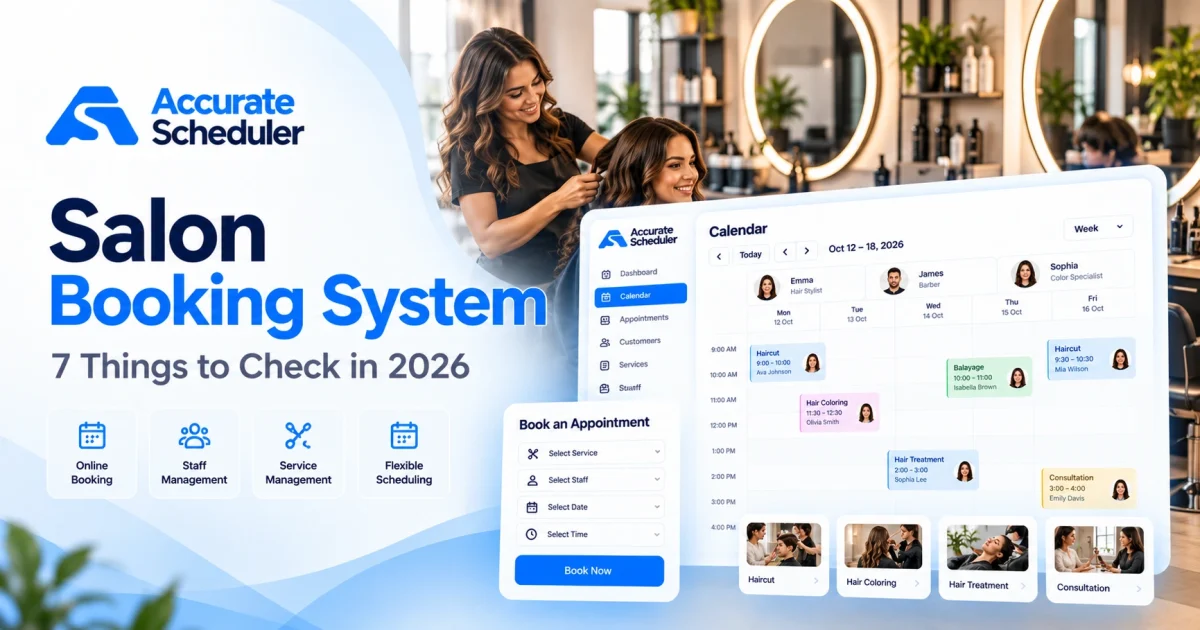
Choosing the right salon booking system can make a significant difference to how your salon operates. From managing stylist availability to accepting online appointments, your booking software affects both your team’s daily work and your customers’ experience.
In 2026, salon owners have plenty of options, including free scheduling tools, dedicated salon management platforms, and booking systems designed for small businesses.
But not every platform offers the same features, pricing structure, or flexibility.
A small hair salon may only need online appointments, staff scheduling, and a simple booking calendar. A larger beauty salon may require additional capabilities such as retail inventory, point-of-sale transactions, memberships, or multi-location reporting.
This guide explains seven important things to check before choosing a salon booking system, including essential features, hidden costs, and practical questions to ask before signing up.
What Is a Salon Booking System?
A salon booking system is software that allows customers to reserve salon services online and helps business owners manage those appointments.
Instead of relying entirely on phone calls, handwritten diaries, or social media messages, customers can use a booking page to choose a service, select an available stylist, and reserve a suitable appointment time.
For example, a customer booking a haircut might:
- Open your salon’s online booking page.
- Select a haircut or styling service.
- Choose their preferred stylist.
- Review available dates and times.
- Complete the booking.
The appointment is then recorded in the scheduling system.
A salon booking system can be particularly useful for hair salons, beauty salons, nail studios, and other appointment-based businesses.
Why Choosing the Right Salon Booking System Matters
Your booking system is more than a digital calendar.
It influences how customers reserve appointments, how staff availability is managed, and how easily your business can handle busy periods.
A well-configured online salon booking system can help:
- Accept appointments outside normal opening hours.
- Organize multiple stylists’ schedules.
- Reduce routine appointment-related phone calls.
- Display available services and appointment times.
- Keep customer booking information organized.
- Manage cancellations and rescheduling.
- Provide a more convenient mobile booking experience.
However, booking software cannot compensate for inaccurate schedules, unclear service durations, or poorly defined cancellation policies.
Choosing the right platform means understanding your business requirements before comparing features.
1. Check Whether the Salon Booking System Supports Online Booking
Online appointment booking should be one of the first features you evaluate.
Customers should be able to view services, choose available times, and complete reservations without needing to call your salon.
What to Look For
A good booking experience should include:
- A mobile-friendly booking page.
- Clear service names and descriptions.
- Available appointment dates and times.
- Stylist selection, where applicable.
- A straightforward customer booking form.
- Clear booking policies.
Example
Imagine a customer searching for a haircut appointment on Saturday evening.
If your salon is closed, a traditional phone-based booking process requires the customer to wait until you reopen.
An online booking page lets the customer check availability and reserve an appointment without waiting for business hours.
Accurate Scheduler provides hosted booking pages that customers can access through a shareable link.
Explore online appointment booking to learn more.
2. Look for Flexible Stylist and Staff Scheduling
Every salon operates differently.
Some businesses have one stylist, while others have several employees working different shifts.
Your salon booking system should support the way your team actually works.
Important Staff Scheduling Features
Look for:
- Individual staff schedules.
- Different working hours for each stylist.
- Holiday and time-off management.
- Service assignments.
- Accurate appointment availability.
- A shared view of upcoming bookings.
Example Staff Schedule
| Stylist | Working Days | Working Hours |
|---|---|---|
| Emma | Monday to Friday | 9:00 AM to 5:00 PM |
| Olivia | Tuesday to Saturday | 10:00 AM to 7:00 PM |
| Sophia | Wednesday to Sunday | 11:00 AM to 6:00 PM |
Illustrative schedule.
If Emma is unavailable on Friday, customers should not be offered appointments with her during that period.
Accurate Scheduler supports unlimited staff members, staff shifts, holidays, and service assignments in its Free plan, subject to applicable booking limits.
Learn more about team scheduling.
3. Compare Service Durations and Booking Flexibility
Not every salon service takes the same amount of time.
A basic haircut may take 30 minutes, while hair coloring or a complete styling package may require much longer.
A salon appointment booking system should let you configure realistic service durations.
Example Salon Services
| Service | Duration | Example Price |
|---|---|---|
| Women’s Haircut | 45 minutes | $40 |
| Men’s Haircut | 30 minutes | $25 |
| Hair Coloring | 120 minutes | $95 |
| Blow Dry | 30 minutes | $30 |
| Hair Treatment | 60 minutes | $55 |
Example prices only. Set your own prices and durations.
You may also need additional time between appointments for cleaning, preparation, or equipment setup.
For example, a 45-minute appointment followed by a 10-minute buffer requires 55 minutes of occupied scheduling time.
Accurate Scheduler offers configurable service durations and buffer time functionality in supported plans.
Read our guide to appointment buffer time.
4. Understand Salon Booking System Pricing and Hidden Costs
Price is an important consideration, especially for small salons.
However, comparing only the advertised subscription fee can be misleading.
Some salon booking software providers charge per staff member, per location, or through additional services. Others may apply marketplace-related charges or payment processing fees.
Common Pricing Models
| Pricing Model | How It Works | What to Check |
|---|---|---|
| Free plan | No base subscription fee | Appointment and feature limits |
| Monthly subscription | Recurring monthly charge | Staff and location allowances |
| Per-staff pricing | Cost increases with team size | Total cost as you hire |
| Per-location pricing | Charges for each salon branch | Multi-location costs |
| Marketplace model | May charge for customer acquisition | New-customer fees |
| Payment processing | Transaction-based charges | Provider rates and refunds |
Example: Calculate the Real Cost
Suppose a salon has four stylists.
A hypothetical system charging $15 per stylist per month would cost:
4 × $15 = $60 per month
That is $720 per year before payment processing fees or additional charges.
A flat-fee platform may cost less or more depending on its limits and included functionality.
Always calculate the full annual cost based on your actual team size and expected bookings.
What About Free Salon Booking Systems?
A free salon booking system can be a useful starting point for a new or small business.
Accurate Scheduler offers a Free plan with online appointment booking, unlimited staff members, and unlimited services, subject to appointment and other applicable limits.
Paid options provide additional booking capabilities and capacity.
Review Accurate Scheduler pricing for current plan details.
5. Review Payment Options and Cancellation Policies
Salons use different payment methods.
Some collect payment after the appointment, while others accept online payments in advance.
Your booking software should support the payment process you want to offer.
Questions to Ask
- Which payment gateways are supported?
- Can customers pay online?
- Are transaction fees charged separately?
- Can customers cancel their appointments?
- Is customer rescheduling available?
- Can you configure booking policies?
- Are refunds handled through the payment provider?
Accurate Scheduler supports PayPal and paid Stripe functionality.
It also provides customer cancellation and rescheduling capabilities according to the relevant plan and configuration.
Before choosing any platform, test how payments, cancellations, and rescheduling work together.
Explore payment features.
6. Check the Customer Booking Experience on Mobile
Many customers discover salons through Google Search, Instagram, and other mobile experiences.
A booking page that works well on desktop but poorly on mobile can make reservations unnecessarily difficult.
Mobile Booking Checklist
Test whether customers can:
- Read service names clearly.
- Select a stylist without confusion.
- View available dates.
- Choose a time slot.
- Complete booking details.
- Review appointment information.
Avoid requesting unnecessary information during the booking process.
For example, a customer booking a simple haircut may not need to complete a lengthy questionnaire.
Accurate Scheduler provides mobile-friendly booking pages designed for customers using different screen sizes.
Test the Full Booking Journey
Do not judge a platform only by its homepage or dashboard screenshots.
Create a test appointment on a real mobile device.
Check every step from service selection to the final appointment record.
7. Make Sure the System Fits Your Salon as It Grows
The best salon booking system for a new business may not be the best choice for a larger salon.
Before choosing software, think about what your business might need over the next 12 to 24 months.
Questions for Growing Salons
Will you need:
- More stylists?
- Additional services?
- Higher monthly appointment capacity?
- Multiple service durations?
- Customer rescheduling?
- Group appointments?
- Calendar integrations?
- More advanced payment options?
Accurate Scheduler offers appointment scheduling features for businesses of different sizes.
However, it is important to distinguish scheduling software from a complete salon operations platform.
If your business requires inventory management, retail point of sale, payroll commissions, chair rentals, or advanced membership billing, verify those capabilities separately.
Do not assume that every salon booking platform includes them.
Salon Booking System vs Complete Salon Management Software
These terms are often used interchangeably, but they can describe different product scopes.
| Capability | Appointment Booking System | Full Salon Management Platform |
|---|---|---|
| Online appointments | Core feature | Commonly included |
| Staff availability | Commonly included | Commonly included |
| Service scheduling | Core feature | Commonly included |
| Customer booking records | Commonly included | Commonly included |
| Retail inventory | Not always included | May be included |
| In-store POS | Not always included | May be included |
| Payroll and commissions | Not always included | May be included |
| Membership management | Not always included | May be included |
| Multi-location reporting | Depends on platform | May be included |
A small salon primarily needing appointment scheduling may not benefit from paying for complex operational features it does not use.
On the other hand, a larger salon with retail products, several locations, and commission-based staff may need a more specialized platform.
Choose based on your actual requirements rather than the number of features advertised.
Popular Salon Booking Software Options in 2026
Several established platforms serve the salon and beauty industry.
These include:
Fresha: A beauty and wellness platform combining appointments with marketplace and business management functionality.
Booksy: A booking and business management platform serving barbers, beauty professionals, and other appointment-based providers.
Square Appointments: A scheduling option closely connected to Square’s payment ecosystem.
Vagaro: A salon and wellness platform offering scheduling alongside broader business management capabilities.
Accurate Scheduler: A general-purpose appointment scheduling platform offering hosted booking pages, unlimited staff and services in Free, and additional paid scheduling features.
Each platform has a different business model and feature scope.
For a broader independent comparison, see Capterra’s salon booking software review analysis.
The best choice depends on whether your priority is affordable scheduling, marketplace customer discovery, integrated point of sale, or advanced salon operations.
How to Set Up a Salon Booking System With Accurate Scheduler
If your salon primarily needs online appointments and staff scheduling, you can start with a straightforward setup.
Step 1: Create Your Account
Visit Accurate Scheduler and choose the appropriate plan.
Step 2: Add Your Salon Services
Create services such as haircuts, coloring, styling, and treatments.
Configure durations and prices.
Step 3: Add Your Stylists
Create staff profiles and assign the services each stylist provides.
Step 4: Configure Working Hours
Set individual shifts, holidays, and unavailable periods.
Step 5: Review Booking Settings
Check appointment availability, cancellation options, payment settings, and any relevant buffer times.
Step 6: Test Your Booking Page
Create a test appointment from a mobile device.
Confirm that the correct service, stylist, date, and time are recorded.
Step 7: Share Your Booking Link
Add the booking link to your website and relevant business profiles.
You can also explore the Accurate Scheduler Hair Salon Demo to see an example booking experience.
Common Mistakes When Choosing Salon Booking Software
Choosing Based Only on the Lowest Price
A low subscription fee may not include the booking capacity or integrations you need.
Compare the complete cost.
Ignoring Staff Scheduling Requirements
Make sure individual stylist availability is supported before launching.
Overlooking Mobile Usability
Test the booking process on mobile, not just desktop.
Paying for Features You Will Never Use
A small salon may not need advanced inventory, payroll, or enterprise reporting.
Forgetting to Test Booking Rules
Check that unavailable staff and occupied appointment times cannot be selected incorrectly.
Creating Duplicate Booking Processes
If you accept bookings through phone calls, walk-ins, and online reservations, establish a consistent method for recording occupied time.
Frequently Asked Questions About Salon Booking Systems
What is the best salon booking system for a small salon?
The best option depends on your staff size, booking volume, payment requirements, and budget. Accurate Scheduler is worth considering for salons focused on online appointments and staff scheduling. Businesses needing specialized POS, inventory, or payroll should compare dedicated salon management platforms.
Is there a free salon booking system?
Yes. Accurate Scheduler offers a Free plan with online booking, unlimited staff members, and unlimited services, subject to applicable limits. Other providers may offer free plans or trials with different conditions.
Can customers book salon appointments online?
Yes. An online salon booking system lets customers choose services, available staff members, and appointment times through a booking page.
Can a salon booking system manage multiple stylists?
Yes. Accurate Scheduler supports individual staff shifts, holidays, and service assignments.
Does salon booking software support online payments?
Many platforms support online payments. Accurate Scheduler offers PayPal and Stripe integrations according to the relevant plan.
Do I need a website to use a salon booking system?
Not necessarily. Accurate Scheduler provides hosted booking pages that can be shared through a direct link.
What is the difference between salon booking software and salon management software?
Salon booking software focuses on appointments, availability, and scheduling. Full salon management software may also include retail inventory, point of sale, payroll, memberships, and other operational tools.
Final Thoughts: Choosing the Right Salon Booking System in 2026
The right salon booking system should make it easier for customers to reserve appointments and for your team to manage daily schedules.
Before choosing a platform, compare online booking, staff availability, service durations, pricing, payments, mobile usability, and future growth requirements.
For small and growing salons that primarily need appointment scheduling, Accurate Scheduler offers a Free starting point with unlimited staff and services, subject to applicable plan limits.
If your salon requires specialized retail, payroll, or multi-location operations, compare those requirements separately before committing.
Ready to simplify your salon appointments?
Explore Accurate Scheduler or compare Free and Paid plans.
You can also try the Hair Salon Booking Demo to see how an online booking experience works.