Online booking software for business growth is most useful when it removes a specific obstacle between a customer’s intention and an appointment the business can deliver. It can make availability easier to find, reduce routine coordination and give staff a more consistent process. It does not create demand automatically or guarantee higher revenue.
A booking page can even expose a problem: unclear services, unsuitable availability or a capacity limit the business had not measured. That information is useful if you act on it. This guide explains the mechanisms through which online booking can support growth and how to measure them without confusing activity with a business result.
In this article
Start with the constraint, not the software
Ask where the customer journey currently slows down. Do inquiries wait for a reply? Do customers struggle to choose the right service? Are staff spending time negotiating routine appointment times? Does the business lose visibility when customers change their plans?
Choose one constraint that you can observe. “We need more growth” is too broad to test. “Customers asking about a standard consultation often wait until the next working day to receive available times” identifies a process that online booking may improve.
Also check whether the business can serve additional appointments well. More bookings are not automatically beneficial if they create late running, exhausted staff or appointments that do not match the service. Growth should be considered alongside delivery capacity and customer experience.
1. Reduce the delay between interest and action
A clear booking route lets customers see offered times when they are ready to act. They do not have to wait for a staff member to send the same availability information manually. This can be especially useful when customers browse outside working hours.
The effect depends on the quality of the page. A confusing service menu or a difficult form can replace one delay with another. Treat the page as a customer decision process: what is the service, is it suitable, what does it cost and what happens after booking?
Measure completed appointments from the booking route rather than assuming every page visit represents demand. If visitors reach the page but do not reserve, investigate the reason before adding more traffic. The available times, service explanation or technical experience may be the real constraint.
2. Make services easier to choose
A well-organized service menu can help customers understand the business’s offer. Clear names, durations and descriptions reduce the need for preliminary questions. The benefit comes from the explanation, not merely from placing every internal service code online.
Use a small number of meaningful choices. If customers repeatedly select the wrong option, review the naming and eligibility guidance. A consultation route may be more appropriate for uncertain or customized work than an instant fixed-duration appointment.
Track corrections by service. If one service creates many changes after booking, that is a useful signal. It may need a better description, different duration or a review process. Fixing that mismatch can improve both customer experience and staff capacity.
3. Give staff a more consistent appointment record
A structured booking process can collect the information needed for ordinary appointments in a consistent format. Staff spend less time reconstructing details from separate messages when the service, time and customer context are recorded clearly.
Consistency still requires discipline across channels. Telephone and in-person bookings should enter the same authoritative schedule promptly. Online booking cannot protect availability if staff continue promising time in a separate notebook that is reconciled later.
Measure the number of appointments requiring clarification before delivery. A reduction can indicate a better process, but inspect what changed. A shorter form might improve completion while leaving staff with more questions; a longer form might do the opposite. Balance both sides.
4. Make changes visible earlier
Customers sometimes need another time or cannot attend. A clear cancellation and rescheduling route can make those changes easier to communicate. The business gains earlier information and can manage the schedule accordingly.
Do not judge this only by the number of cancellations. If easier cancellation replaces unannounced absence, a higher recorded cancellation count may reflect better information rather than worse customer behavior. Keep early changes, late changes and no-shows separate.
The no-show reduction guide explains how to measure those outcomes. Reminders and accessible changes can support attendance, but they should not be presented as a guarantee that every appointment will be kept.
5. Support repeat appointments with a clear next step
After a successful service, customers should know how to book again. That might be a returning-client service, a relevant booking link or a staff-assisted follow-up. The route should match the business relationship rather than sending every customer the same generic message.
Keep the next appointment description clear. A returning visit may have different preparation or duration from a first consultation. Avoid making loyal customers repeat unnecessary information while still collecting what staff genuinely need.
Measure repeat booking over an appropriate period for the service. A weekly training session and an occasional consultation have different patterns. Do not compare them using one arbitrary retention window and then draw broad conclusions about the software.
6. Understand capacity more clearly
A dependable calendar helps the team see which times are offered and which are occupied. That can support better decisions about staff hours and service availability. It does not, by itself, explain profitability or prove that every open slot should be filled.
Separate bookable capacity from total working hours. Staff need preparation, administration, breaks and other work. A calendar that treats all non-appointment time as waste can encourage a schedule the business cannot sustainably deliver.
Use a practical capacity question: “Which additional appointments could we serve well with the resources available?” The answer may involve a different service mix or better timing rather than extending everyone’s working day.
Measure online booking software for business growth
Choose a few measures that correspond to the problem you are trying to solve. Define each one and keep the definition stable. A basic worksheet can be enough; do not assume your booking product includes every analytics feature you might want.
| Measure | Example definition | Decision it can support |
|---|---|---|
| Booking completion | Completed reservations divided by measured booking starts | Find friction in the reservation journey |
| Correction rate | Appointments staff must repair before delivery | Improve service descriptions or configuration |
| Attendance | Kept appointments under a consistent definition | Review preparation and change processes |
| Handling time | Observed staff time arranging and changing appointments | Evaluate administrative workload |
| Repeat booking | Customers returning within a service-appropriate period | Improve the follow-up route |
| Deliverable capacity | Appointment time the business can realistically offer | Plan availability without overloading staff |
Use only data you can collect reliably and appropriately. If booking-start tracking is unavailable, do not invent a conversion rate. You can still learn from completed appointments, staff corrections and customer questions.
A worked example with hypothetical numbers
Imagine a small consultation business receiving 80 routine scheduling inquiries in a month. Staff estimate that each requires eight minutes of coordination, including changes, for a total of 640 minutes. These are illustrative inputs, not a benchmark or a claim about Accurate Scheduler.
During a pilot, the same business observes 80 comparable appointments requiring an average of three minutes of staff handling after online booking is introduced. That is 240 minutes, a difference of 400 minutes. The next question is how much setup and maintenance time must be subtracted and whether the customer experience remained acceptable.
Even if the net time saving is positive, it is not automatically revenue. The business might use the time for delivery, follow-up, administration or a less pressured working day. A credible evaluation names the actual benefit rather than multiplying every saved minute by a theoretical billing rate.
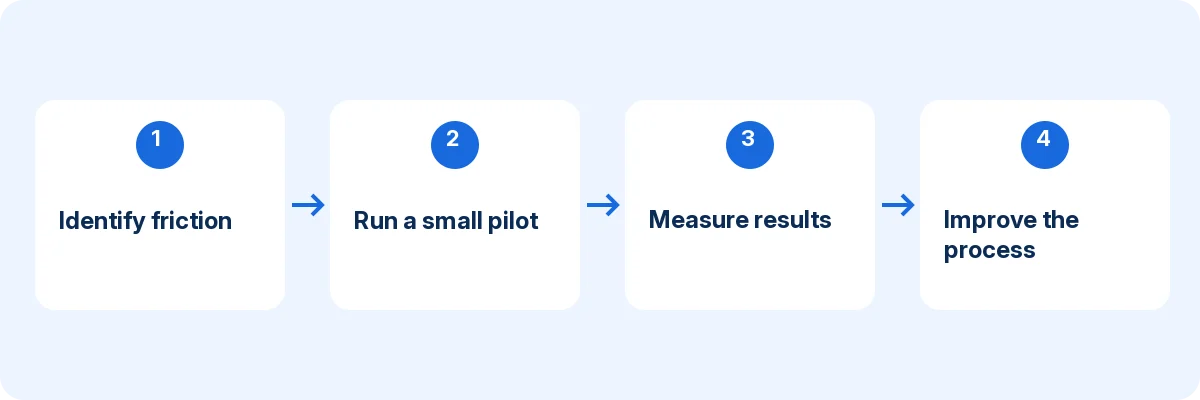
Run a focused experiment
Choose one service and record a baseline for a representative period. Note demand, available hours and any unusual events that may affect comparison. Then introduce the booking route without changing every other part of the offer at the same time.
During the pilot, record completed appointments, corrections, customer questions and staff work. Ask customers who need help where they became uncertain. These observations can explain a result that the counts alone cannot.
At the review point, decide whether to continue, adjust or stop. If bookings rise but corrections also rise sharply, improve the service choices before expanding. If staff handling falls but customers struggle to find suitable times, review availability rather than declaring the project finished.
Avoid the most common growth assumptions
Do not claim that adding a booking button creates demand. Customers still need to discover the business, understand the service and trust the offer. Online booking supports the next step; it does not replace marketing or service quality.
Do not assume every abandoned booking is a technical problem. The customer may not find a suitable time, may need a different service or may simply be researching. Use proportionate feedback and observation rather than inventing a reason from a single metric.
Do not confuse full calendars with healthy operations. A schedule can be full of low-fit appointments that create delays and rework. Review service mix, delivery quality and the team’s ability to maintain the process alongside booking volume.
Build the operating habits that sustain the benefit
Assign responsibility for service descriptions, staff availability and customer communication. Update holidays and staff changes before customers encounter them. Keep the booking link inventory current across the website and other business profiles.
Test the customer journey periodically and after meaningful configuration changes. Use a phone, an external customer identity and a realistic appointment change. Small errors can persist when everyone only looks at the administrator screen.
Keep one authoritative schedule and a clear exception route. A customer who needs human help should know how to obtain it, while staff should know where to record the outcome. A consistent hybrid process is often more useful than insisting every appointment be completely automated.
Where Accurate Scheduler can contribute
Accurate Scheduler is a SaaS appointment booking platform. Its current Free configuration includes online booking, unlimited staff and services, staff shifts and holidays, customer booking access, payment options and booking add-ons, subject to 60 appointments and up to 100 customers. The Free allowance is not labelled monthly. Google Calendar, Google Meet, Zoom and 50+ industry themes are Paid features. Review the current plan comparison and test your required workflow.
Evaluate those features against the constraint you identified. For a full setup process, use the online booking guide; for choosing a product category, read the small-business scheduling comparison. Keep measurement separate from any analytics capabilities that have not been confirmed.
Keep a decision log alongside the numbers
For each pilot change, record the problem, the change made, the observation period and what else changed during that period. For example, a new promotion may bring different customers at the same time that a booking form is shortened. The resulting booking count cannot isolate the effect of the form alone.
Review online booking benefits alongside staff corrections and attended appointments. Appointment business growth is more meaningful when the business can serve the additional work reliably. The workload comparison helps track administrative effort; the launch checklist helps resolve customer friction before expanding traffic.
Frequently asked questions
Will online booking increase revenue?
It may support more convenient booking and reduce administrative friction, but revenue depends on demand, capacity, service mix and delivery. Measure the actual result rather than treating software as a guaranteed growth mechanism.
What should a small business measure first?
Start with the problem you want to solve. If staff spend too long arranging routine appointments, measure handling time and corrections. If customers struggle to complete bookings, observe the journey and track reliable completion data where available.
How long should a pilot run?
Long enough to include a meaningful number of representative appointments and common exceptions. A low-volume business may need longer than a busy one. Avoid making a strong causal claim from a few days with unusual demand.
Use analytics to investigate the booking journey, then compare it with completed appointment records. Google’s Realtime report guidance explains activity and event counts. A visit or event count is not automatically a completed booking, additional revenue or proof that software caused growth.
Make growth easier to evaluate
Start with one measurable booking problem and a service the business can reliably deliver. Compare Accurate Scheduler’s plans, run a focused pilot and use the observed results to decide what to expand.
For next year’s planning, use our 2027 appointment business guide to establish a baseline and improve one booking constraint at a time. Read the guide.