
Bring order to a busy service day.
Give customers a clear way to arrange a service visit, estimate or follow-up. Organize staff availability while keeping travel planning and job details visible in your own operating process.
Compare appointment limits and plan features →
Give each visit a clearer place in the day.
Calls while you are onsite
Offer a booking route customers can use while your team is working.
Unclear visit types
Separate an estimate from a service visit so customers choose the right appointment.
Travel between jobs
Use paid-plan buffer time for a planned gap; route and travel estimates remain your responsibility.
From the first estimate to the follow-up visit.
Estimate appointments
Offer a defined visit for discussing the work before a job is agreed.
Service visits
Set a duration and staff availability that reflect the service you deliver.
Follow-up checks
Create a separate appointment option for a return visit after work is completed.
Start with a practical service schedule.
Keep service types and staff schedules organized. Use paid-plan custom fields for brief visit information and buffer time for the gaps you need.
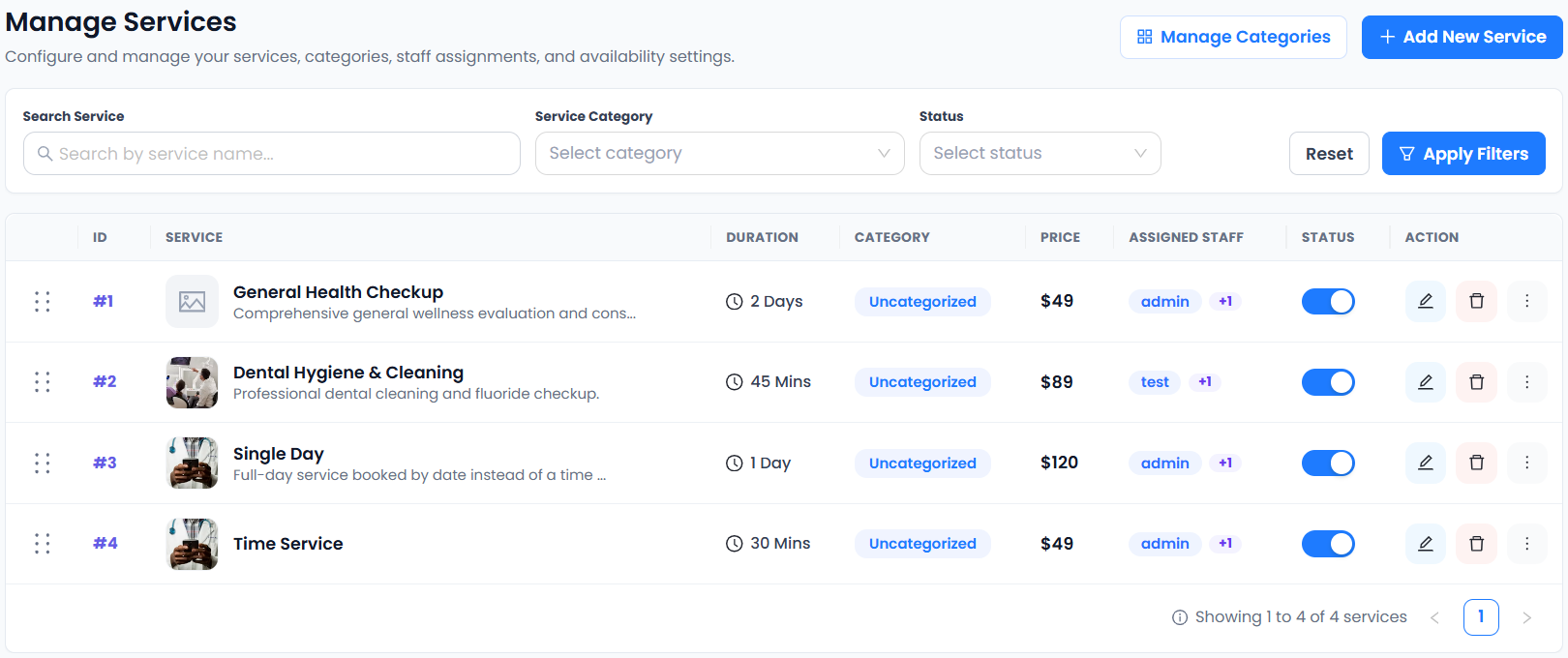
The supplied services capture shows the real controls for duration and staff assignment. It does not demonstrate route planning or dispatch. See which plan fits your workflow.
From choosing a service to making a booking.
- 01Choose a service
- 02Choose staff
- 03Choose a date & time
- 04Enter details & confirm
Less phone coordination between jobs.
Help customers choose a visit type and time without waiting for a callback. Keep job routing, travel estimates and site safety checks in your existing operating process.
Connect the tools your day depends on.

Availability varies by plan. Explore integrations →
Scheduling for home services: a few things to know.
Can customers book an estimate separately from a job?
Yes. Unlimited Services is included in Free. Give the estimate and service visit distinct names and durations so customers understand what they are booking.
Does the scheduler calculate travel routes?
Route optimization and dispatch are not in the confirmed feature list. Plan travel separately; Buffer Time on paid plans can provide a fixed gap between appointments.
Can I ask for brief access instructions?
Custom Fields is included in paid plans. Collect only information needed for the visit and explain how customers can send detailed or sensitive job information safely.
Can I schedule a service that lasts more than one day?
Day-Based Services, Overnight Booking and Single-Day & Multi-Day Services are included in Free. Test the day-based flow against your specific job requirements.